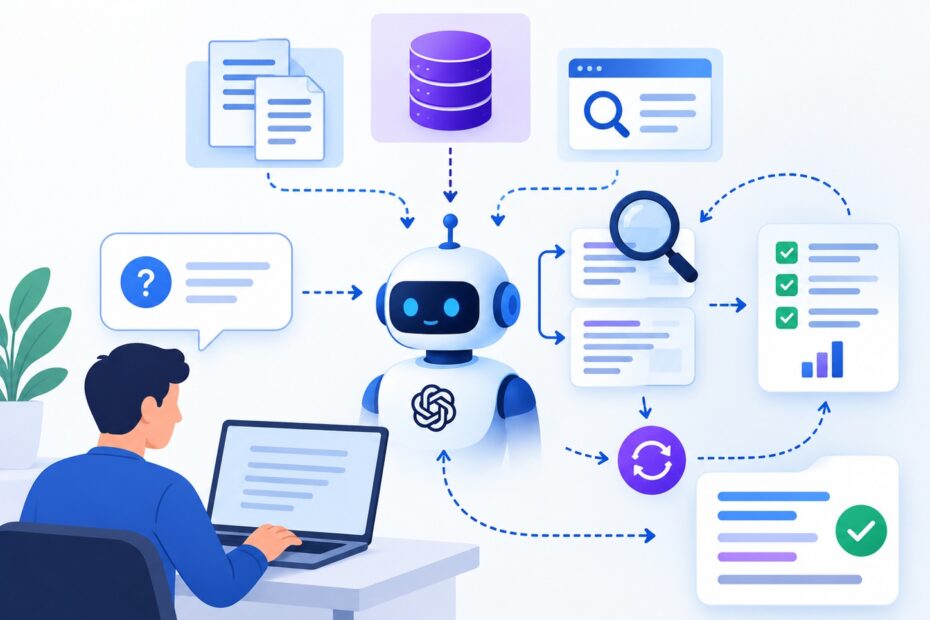
Imagine asking an AI assistant to compare two products, check their latest features, identify their differences, and recommend the better option for your needs.
A basic AI chatbot might try to answer using information from a single search. But what if the answer requires several documents, different data sources, and follow-up searches?
This is where Agentic RAG becomes useful.
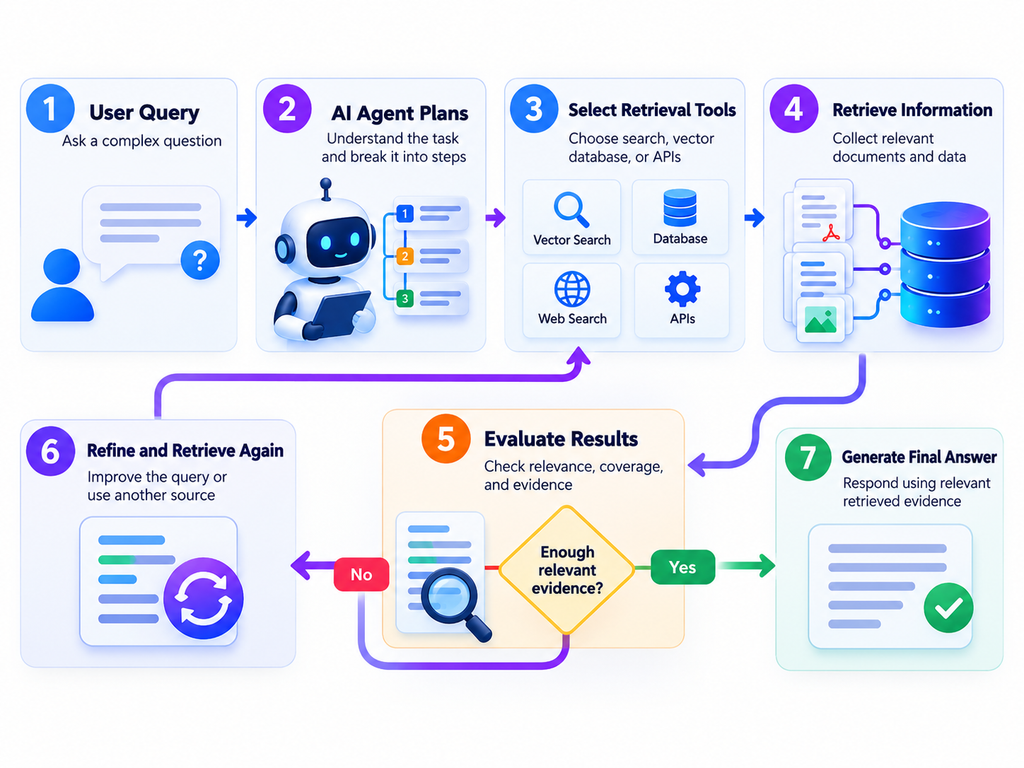
Agentic RAG combines Retrieval-Augmented Generation (RAG) with AI agents that can plan searches, use tools, evaluate retrieved information, and search again when necessary. Instead of following only one fixed retrieval step, the system can adapt its approach to the question.
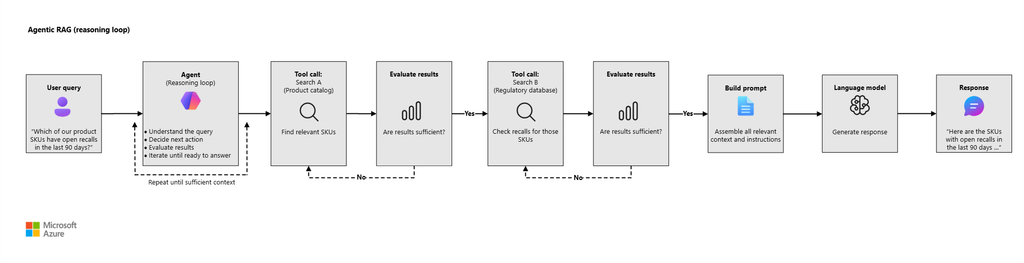
In simple terms, Agentic RAG works by allowing an AI agent to decide what information it needs, retrieve that information, check whether it is sufficient, and generate an answer grounded in the evidence. Microsoft describes this approach as a reasoning loop in which an agent invokes retrieval tools as needed. (Microsoft Learn)
What Is Agentic RAG?
Agentic RAG is an AI architecture that combines an agent’s decision-making abilities with a retrieval system that provides relevant external information to a language model.
To understand it, let’s break down the two main concepts.
Retrieval-Augmented Generation (RAG): RAG allows an AI model to retrieve relevant information from external sources, such as documents, databases, and knowledge bases, before generating an answer.
AI agents: AI agents can interpret a task, select available tools, perform actions, examine the results, and decide what to do next.
When these technologies work together, the agent can control the retrieval process instead of relying entirely on a predefined search pipeline.
For example, if you ask, “Which laptop is better for programming, and how do their battery life and performance compare?”, an Agentic RAG system might retrieve the specifications of both laptops, search for battery information, compare their processors, and then combine the findings into one answer.
The agent doesn’t necessarily need to perform every step. It decides which steps are useful for completing the task.
How Agentic RAG Works Step by Step
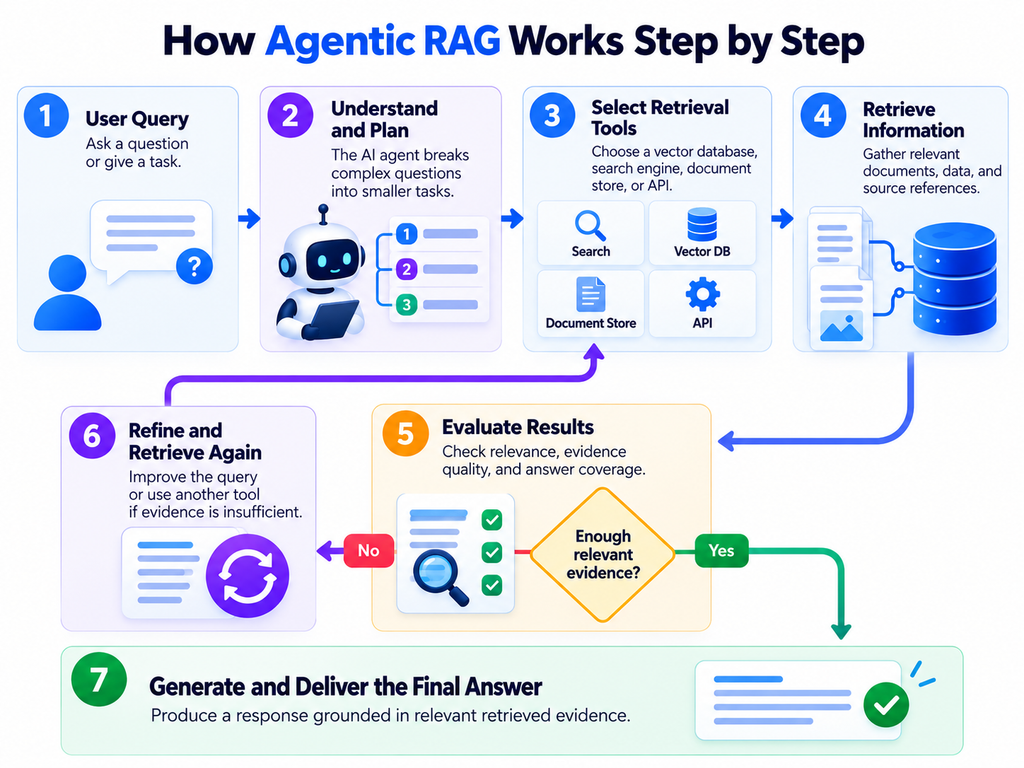
A typical Agentic RAG system follows a flexible workflow. The exact implementation varies depending on the framework, available tools, and complexity of the task.
Step 1: The User Asks a Question
The process begins when a user submits a question or gives the AI a task.
For example:
“Compare the security features of Product A and Product B, and explain which one is better for a small business.”
This request contains multiple information needs. The system must understand the security features of both products and compare them in the context of a small business.
A single search might not provide enough information to answer every part accurately.
Step 2: The AI Agent Understands the Task
The agent interprets the question and identifies the information required to answer it.
It may recognize that it needs to find:
- Security features of Product A
- Security features of Product B
- Pricing or plan restrictions, if relevant
- Differences that matter to small businesses
This process is often called query planning or query decomposition.
Instead of searching the entire question as one long query, the agent can break it into smaller, more focused searches.
Step 3: The Agent Chooses a Retrieval Tool
Next, the agent decides where and how to find the information.
Available tools might include:
- Vector databases for semantic search
- Keyword search for exact product names and technical terms
- Internal document repositories
- SQL databases for structured records
- APIs for retrieving product information
- Web search tools for publicly available information
The agent selects from the tools it has actually been given access to. It cannot automatically access every database or website.
For example, it might use a document search tool to find Product A’s security documentation and another search tool to retrieve Product B’s specifications.
Microsoft’s agentic RAG guidance explains that retrieval tools can wrap existing search systems, including hybrid search, filters, and reranking. (Microsoft Learn)
Step 4: The System Retrieves Relevant Information
The selected retrieval tools search their respective knowledge sources and return relevant information.
A typical RAG retrieval system may use:
- Chunking: Documents are divided into smaller, meaningful sections.
- Embeddings: Text is converted into numerical representations for semantic search.
- Vector or keyword search: Relevant passages are identified.
- Reranking: Candidate passages may be reordered according to their relevance.
- Metadata: Source titles, document dates, and URLs are preserved when available.
The agent receives the results and uses them to determine what information is already available and what is still missing.
Not every Agentic RAG implementation uses all these techniques. The retrieval pipeline depends on the application’s requirements.
Step 5: The Agent Evaluates the Results
This is one of the most important parts of Agentic RAG.
After receiving the search results, the agent determines whether they provide enough useful information to answer the original question.
For example, the first search might reveal the security features of both products but fail to explain which features are included in their entry-level plans.
The agent can recognize this gap and decide to perform another search.
However, an AI agent’s judgment is not always correct. It may incorrectly consider incomplete evidence sufficient, so important applications should also use evaluation rules and tests.
Step 6: The Agent Searches Again When Necessary
If the available evidence is incomplete, the agent can refine its query or choose another tool.
For example:
- Initial search: Product A vs. Product B security features
- Follow-up search: Product A security features for small businesses
- Second follow-up: Product B security features included in the basic plan
The agent can then combine the relevant findings.
This process is known as iterative retrieval.
Unlike a conventional pipeline that performs a predefined search, an Agentic RAG system can adjust its retrieval strategy based on the information it discovers.
The system should stop searching once it has enough evidence, reaches its configured limits, or determines that the question cannot be answered reliably.
Step 7: The AI Generates the Final Answer
Once sufficient evidence has been gathered, the system assembles the relevant context and sends it to the language model.
The model then produces a response that addresses the user’s original question.
A well-designed system can include source references, explain important differences, distinguish confirmed facts from uncertainty, and acknowledge when the available information is insufficient.
The final response should be based on the retrieved evidence rather than unsupported assumptions.
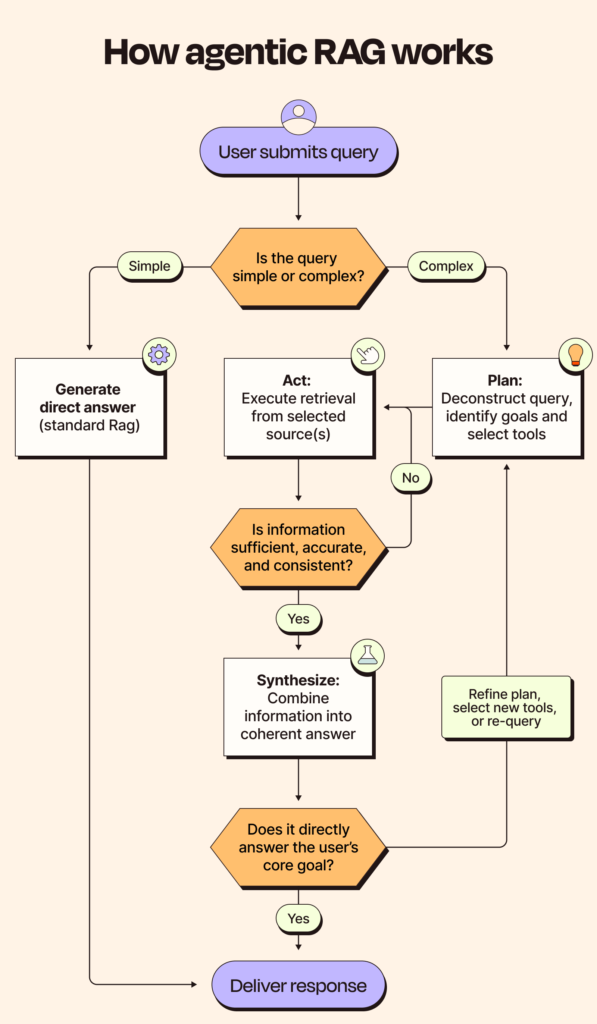
A Simple Agentic RAG Workflow
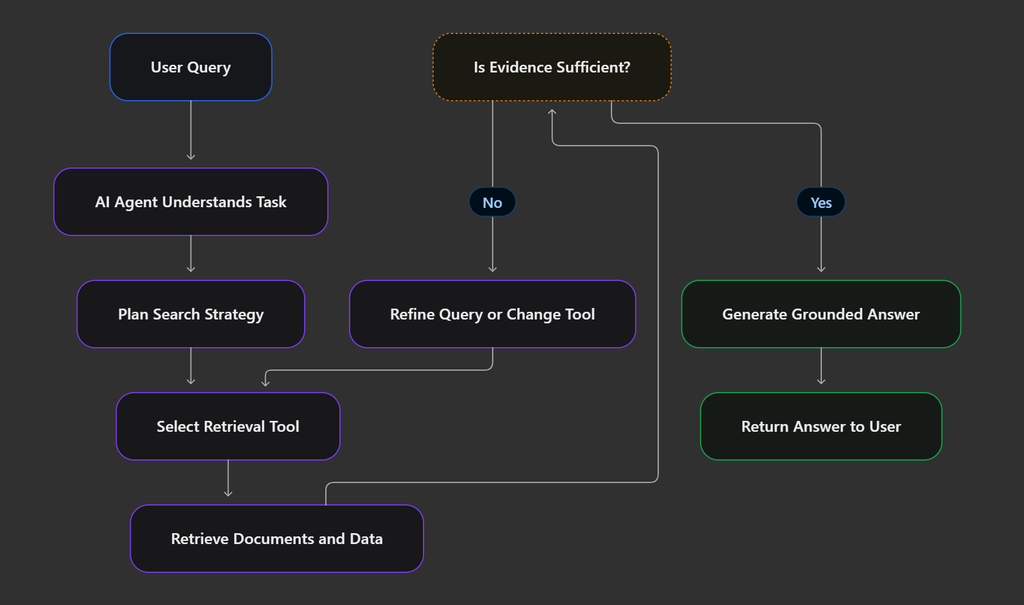
The entire process can be summarized as follows:
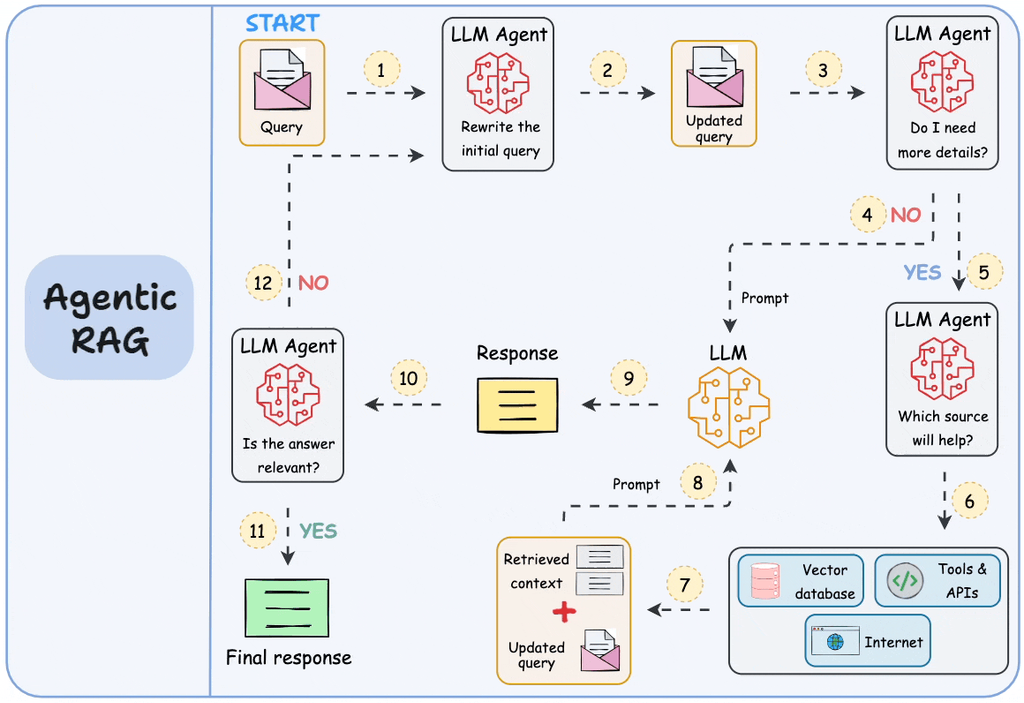
User question → Task understanding → Search planning → Tool selection → Information retrieval → Result evaluation → Additional retrieval if needed → Final answer
The central feature is the feedback loop between retrieval and evaluation. The agent can use the results of one search to decide what to do next.
Microsoft’s documentation describes a similar workflow involving query planning, retrieval from knowledge sources, reranking, and combining the results into information that can support a grounded answer. (Microsoft Learn)
A Real-World Example of Agentic RAG
Let’s imagine a customer-support assistant for an online electronics store.
A customer asks:
“Can I return my laptop after 20 days if the battery is defective, and will the warranty cover the replacement?”
To answer correctly, the assistant may need information from several sources.
First, it searches the return policy. It finds the standard return window but doesn’t yet know whether defective products have special conditions.
Next, it searches the warranty documentation. It retrieves the rules for battery defects and replacement eligibility.
Then, it checks the product details. If the policy depends on the laptop model or purchase date, the assistant may need to retrieve those details from an authorized system.
Finally, it combines the evidence. The assistant explains the applicable return conditions, warranty coverage, and any limitations supported by the available documents.
If the information is incomplete, it should ask for the missing details or explain that it cannot confirm eligibility.
This example demonstrates why Agentic RAG is useful: the system can gather information from different sources and adapt its search process to the customer’s actual question.
Traditional RAG vs. Agentic RAG
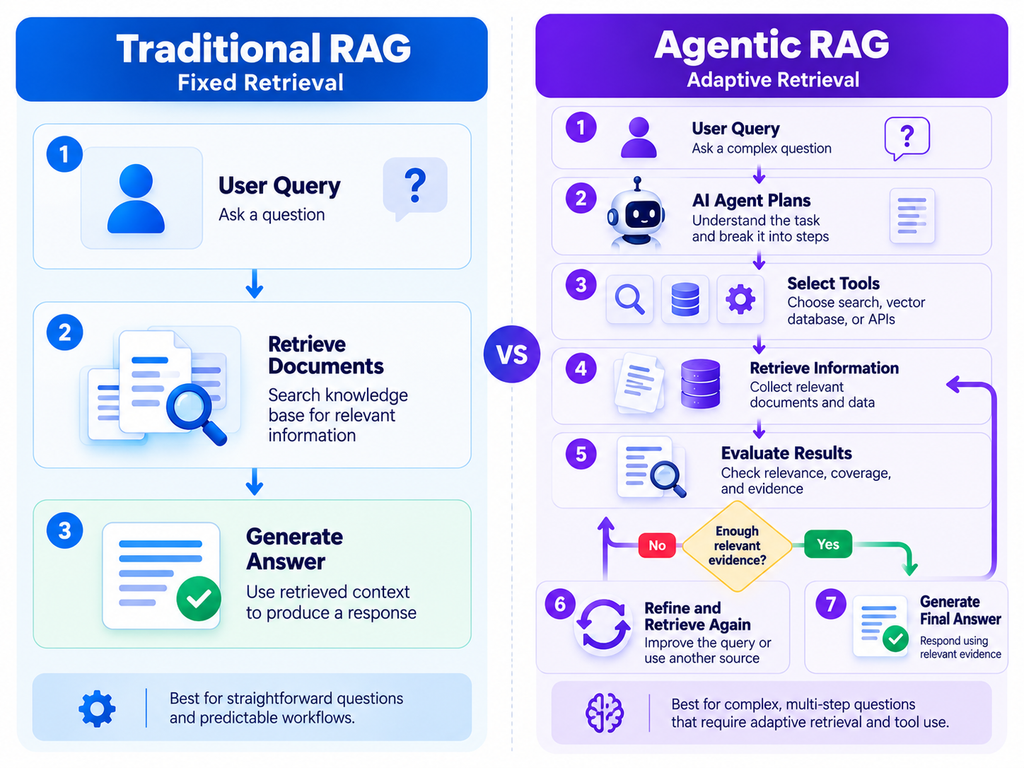
Both architectures use retrieval to provide external information to an LLM, but they handle the retrieval process differently.
| Feature | Traditional RAG | Agentic RAG |
|---|---|---|
| Search process | Usually predefined | Can adapt to the task |
| Query planning | Often handled by fixed application logic | Agent can decompose questions |
| Tool selection | Generally configured in advance | Agent can select among available tools |
| Multiple retrieval steps | Possible, but often predefined | Can be decided dynamically |
| Result evaluation | May use fixed rules | Agent can evaluate intermediate results |
| Complexity | Generally lower | Generally higher |
| Cost and latency | Often easier to predict | Can increase with additional steps |
| Best suited for | Straightforward information retrieval | Complex, multi-step questions |
Which one is better? Neither is automatically better for every application.
Traditional RAG is often the better choice when one search can answer a question. Agentic RAG is more useful when the system needs to plan, retrieve from multiple sources, or search again based on intermediate findings.
What Are the Main Components of Agentic RAG?
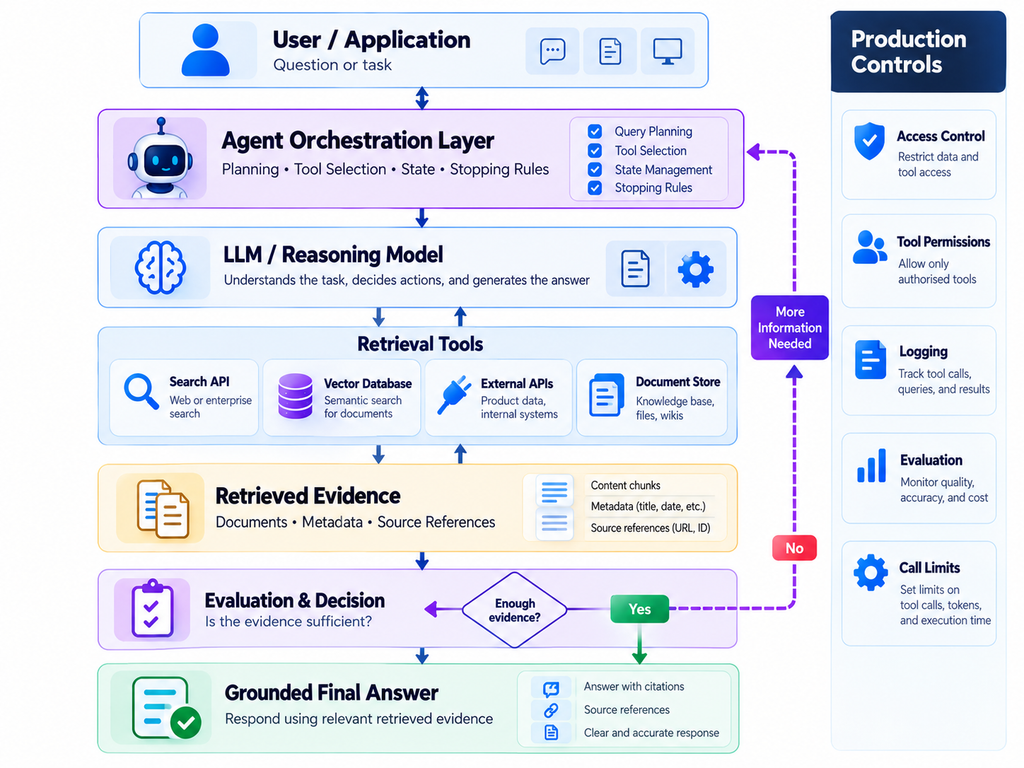
A practical Agentic RAG architecture generally includes the following components.
1. AI Agent
The agent interprets the user’s request, selects tools, and determines the next action.
2. Language Model
The language model powers the agent’s decisions and generates the final response. Depending on the architecture, different models may handle planning and answer generation.
3. Retrieval Tools
These tools connect the agent to searchable documents, vector databases, APIs, or other information sources.
4. Knowledge Base
The knowledge base contains or connects to the information the system is allowed to retrieve.
5. Evaluation and Stopping Rules
These help determine whether the retrieved evidence is sufficient and when the system should stop searching.
6. Monitoring and Security
Monitoring tracks tool calls, latency, errors, and costs. Security controls ensure that the agent only accesses information and actions it is authorized to use.
These components work together to make retrieval more flexible while keeping the process manageable.
What Are the Benefits of Agentic RAG?
Agentic RAG offers several potential benefits when an application has complex information requirements.
Better handling of complex questions: The agent can split a large request into smaller information needs.
Flexible retrieval: It can select different tools or data sources based on the task.
Iterative search: The agent can refine queries when the first results are incomplete.
Multi-source answers: Information from several documents or systems can be combined into one response.
More transparent evidence gathering: With appropriate logging and source references, developers can inspect which sources were used.
These benefits depend on the quality of the agent, retrieval system, source data, and evaluation process. Agentic RAG does not automatically guarantee more accurate answers.
What Are the Limitations of Agentic RAG?
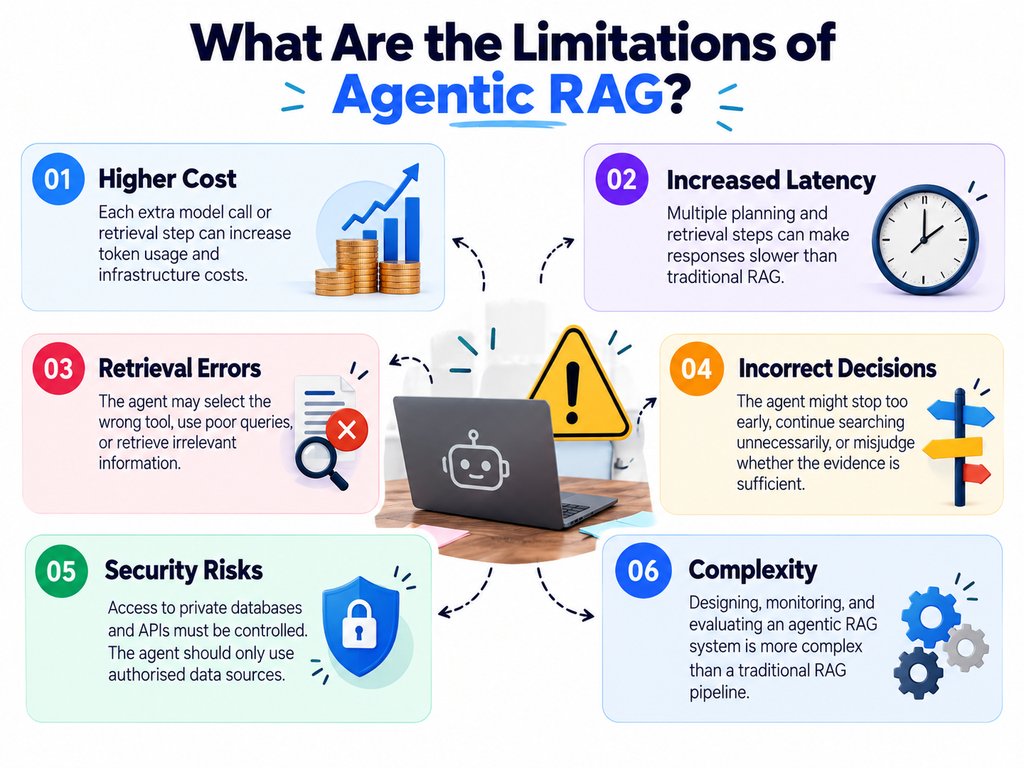
The additional flexibility also introduces new challenges.
Higher Cost
Each extra model call or retrieval operation can increase token usage and infrastructure costs.
Increased Latency
A system that searches several times may take longer than one that performs a single retrieval operation.
Retrieval Errors
The agent may select the wrong tool, use an ineffective query, or retrieve irrelevant information.
Incorrect Decisions
The agent might stop too early, continue searching unnecessarily, or incorrectly conclude that the evidence supports an answer.
Security Risks
Tools connected to private databases or APIs must enforce access permissions. The agent should never receive broader access than the user or application authorizes.
To address these limitations, developers should set retrieval limits, monitor tool calls, evaluate answers against test datasets, and provide fallback behavior when evidence is insufficient.
How to Build an Agentic RAG System
If you’re developing an Agentic RAG application, start with a working traditional RAG pipeline rather than building a complicated agent immediately.
Step 1: Prepare your knowledge base. Collect the relevant documents, parse them correctly, divide them into useful chunks, and preserve metadata.
Step 2: Implement retrieval. Add vector search, keyword search, or hybrid search, depending on the content and query types.
Step 3: Expose retrieval as a tool. Create a clearly defined function such as search_knowledge_base(query) that the agent can invoke.
Step 4: Add an agent. Give the agent instructions explaining which tools are available and when to use them.
Step 5: Support multiple retrieval steps. Allow the agent to refine searches when the initial evidence is insufficient.
Step 6: Add guardrails. Set maximum tool calls, timeouts, token budgets, and permissions.
Step 7: Evaluate the complete workflow. Test whether the agent chooses the correct tools, retrieves relevant information, produces grounded answers, and meets acceptable cost and latency targets.
Microsoft provides a practical implementation guide for exposing retrieval functions as tools and controlling the agent’s reasoning loop. (Microsoft Learn)
Best Practices for Reliable Agentic RAG
For a dependable implementation, follow these principles:
- Start simple: Use traditional RAG when it meets the application’s needs.
- Define tools clearly: Explain what each tool searches and what information it returns.
- Preserve source metadata: Keep document titles, URLs, dates, and other useful references.
- Set stopping limits: Prevent unnecessary retrieval loops.
- Measure performance: Track answer quality, retrieval accuracy, latency, and cost.
- Protect private information: Enforce permissions in the retrieval layer, not just in the agent’s instructions.
- Test failure cases: Include ambiguous questions, missing documents, conflicting sources, and questions with no supported answer.
The goal is not to make the agent perform as many steps as possible. The goal is to gather enough reliable evidence to answer the question with the least unnecessary work.
Frequently Asked Questions
How does Agentic RAG work in simple terms?
Agentic RAG lets an AI agent control information retrieval. The agent understands a question, searches relevant sources, checks the results, performs additional searches when necessary, and generates an answer based on the collected evidence.
What is the difference between RAG and Agentic RAG?
Traditional RAG usually follows a predefined retrieval pipeline. Agentic RAG allows the agent to decide which retrieval tools to use, whether to search again, and when enough information has been collected.
Does Agentic RAG always use a vector database?
No. It can use vector databases, keyword search, SQL databases, APIs, document repositories, or a combination of these tools. The architecture depends on the application’s information needs.
Can Agentic RAG reduce hallucinations?
It can help by retrieving additional evidence and supporting source-based answers. However, it cannot eliminate hallucinations, and an agent may still misinterpret or overlook relevant information. Evaluation and grounding remain essential.
Is Agentic RAG expensive?
It can cost more than traditional RAG because planning and repeated retrieval may require additional model calls and searches. The actual cost depends on the model, number of tool calls, context size, and retrieval infrastructure.
When should you use Agentic RAG?
Use it when questions require multiple retrieval steps, query decomposition, dynamic source selection, or combining information from different systems. For simple questions that one search can answer, traditional RAG may be more efficient.
What tools are used to build Agentic RAG?
Developers can combine an LLM with retrieval tools, vector databases, search engines, document stores, APIs, and agent orchestration frameworks. The appropriate stack depends on the workload and technical requirements.
Is Agentic RAG the same as an AI agent?
No. An AI agent is a broader system that can plan and use tools to complete tasks. Agentic RAG is a particular approach in which the agent actively manages retrieval as part of answering a question.
Conclusion: Why Agentic RAG Matters
Agentic RAG makes retrieval more flexible by allowing an AI agent to decide what information it needs, which sources to search, and whether additional evidence is required.
Instead of relying entirely on a fixed search pipeline, the system can plan, retrieve, evaluate, and refine its approach before generating a response.
This makes Agentic RAG a promising architecture for enterprise search, customer support, technical research, and other applications that require information from multiple sources.
However, adding an agent also introduces additional cost, latency, and complexity. The best approach is to start with a reliable RAG baseline, introduce agentic behavior where it provides clear value, and evaluate the complete system before deployment.
The key takeaway: Agentic RAG isn’t just about retrieving information. It’s about allowing an AI system to manage the retrieval process intelligently so it can gather the right evidence for more complex questions.