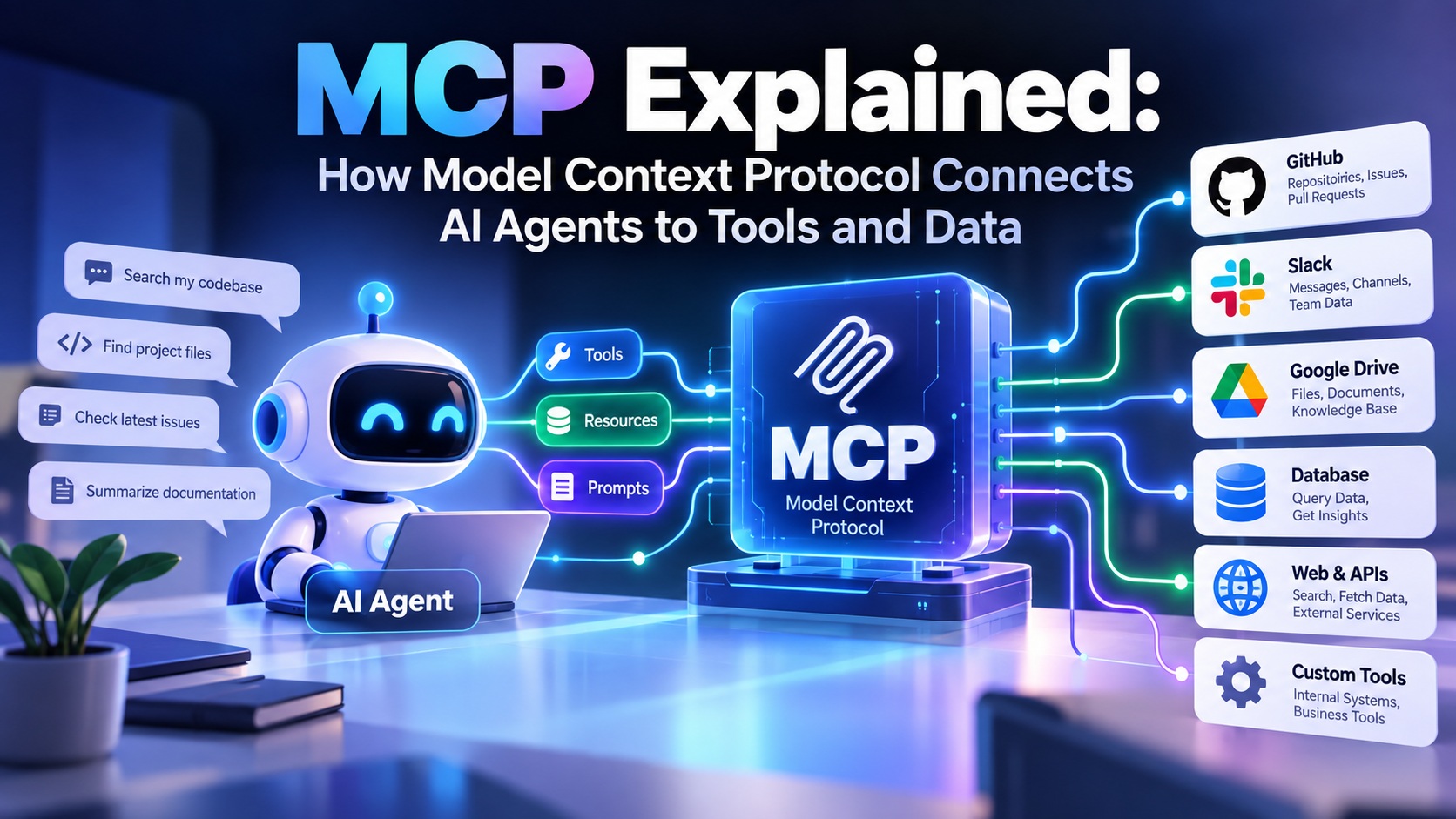
AI assistants are getting much better at reasoning, coding, researching, and completing multi-step tasks. But there is a basic problem that does not disappear just because the model gets smarter:
An AI model cannot automatically access the systems where your useful information and actions actually live.
Your company may have data in GitHub, Slack, Google Drive, databases, CRMs, internal APIs, project-management tools, and dozens of other systems. Traditionally, developers had to build custom integrations for each one.
That is where MCP, or Model Context Protocol, comes in.
MCP is an open protocol designed to standardize how AI applications connect to external tools and data. Anthropic introduced MCP in November 2024 as a way to reduce fragmented, one-off integrations between AI systems and external data sources.
Think of MCP as a standard connection layer for AI applications.
Instead of building a completely different integration for every AI application and every tool, developers can build around a common protocol.
And that distinction is important.
MCP is not simply another AI model, another chatbot, or a replacement for every API. It is a way of making the connection between AI applications and external capabilities more standardized.
What Is MCP?
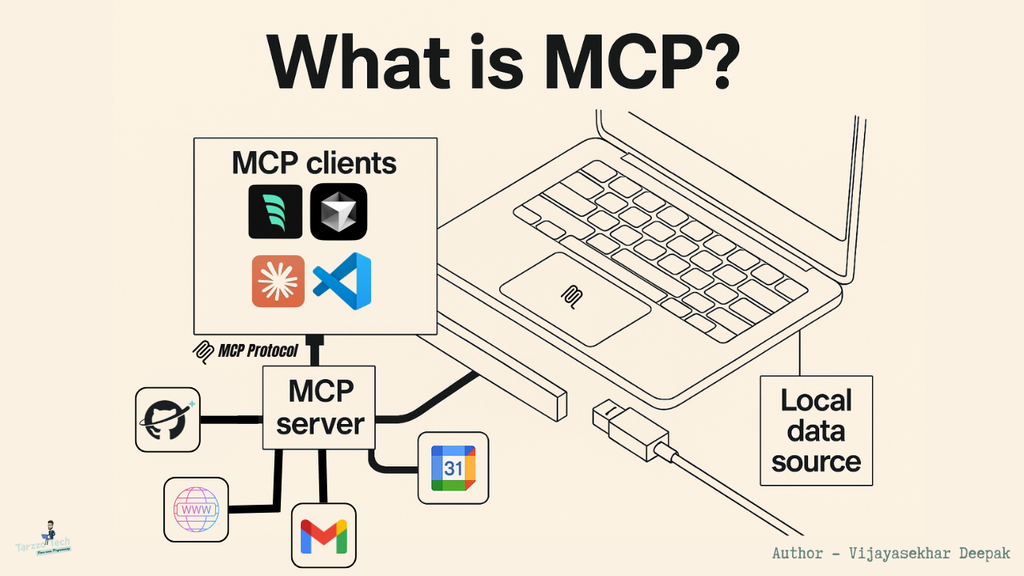
MCP stands for Model Context Protocol.
In simple terms, MCP is a standardized protocol that allows an AI application to discover and interact with external tools, resources, and prompts.
Anthropic describes MCP using a USB-C analogy: USB-C gives devices a standardized way to connect to peripherals, while MCP provides a standardized way for AI applications to connect to tools and data.
A simplified MCP architecture looks like this:
AI application → MCP client → MCP server → external system
For example:
AI coding assistant → MCP → GitHub
Or:
AI agent → MCP → PostgreSQL database
Or:
AI assistant → MCP → company knowledge base
The important idea is that the AI application does not necessarily need a completely custom integration for every individual system.
An MCP server provides a standardized interface that the AI application can interact with.
Why Was MCP Created?
Before protocols such as MCP became popular, developers often created custom integrations between AI applications and external services.
Imagine you are building an AI assistant that needs access to:
- GitHub
- Slack
- Google Drive
- PostgreSQL
- Jira
- Internal company APIs
Without a common integration layer, each connection can require its own implementation, authentication logic, schemas, error handling, and maintenance.
Now imagine another AI application needs access to those same services.
The same integration problem appears again.
This is one of the problems MCP was designed to address.
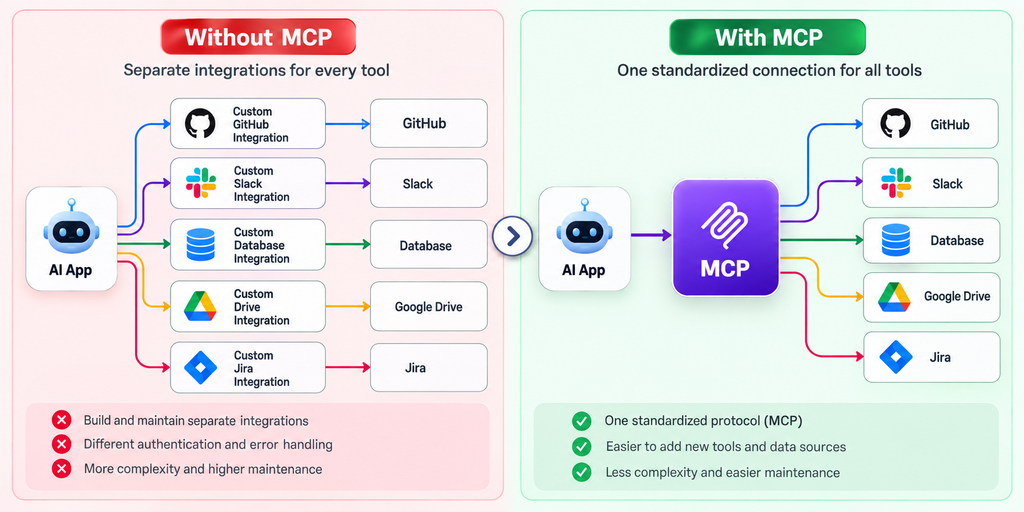
Instead of thinking:
AI app → custom GitHub integration
AI app → custom Slack integration
AI app → custom database integration
developers can work toward a more standardized pattern:
AI app → MCP → GitHub
AI app → MCP → Slack
AI app → MCP → database
That does not eliminate all engineering work. Authentication, permissions, deployment, monitoring, and application-specific logic still matter.
But it creates a common protocol for the AI-to-tool connection.
How Does MCP Work?
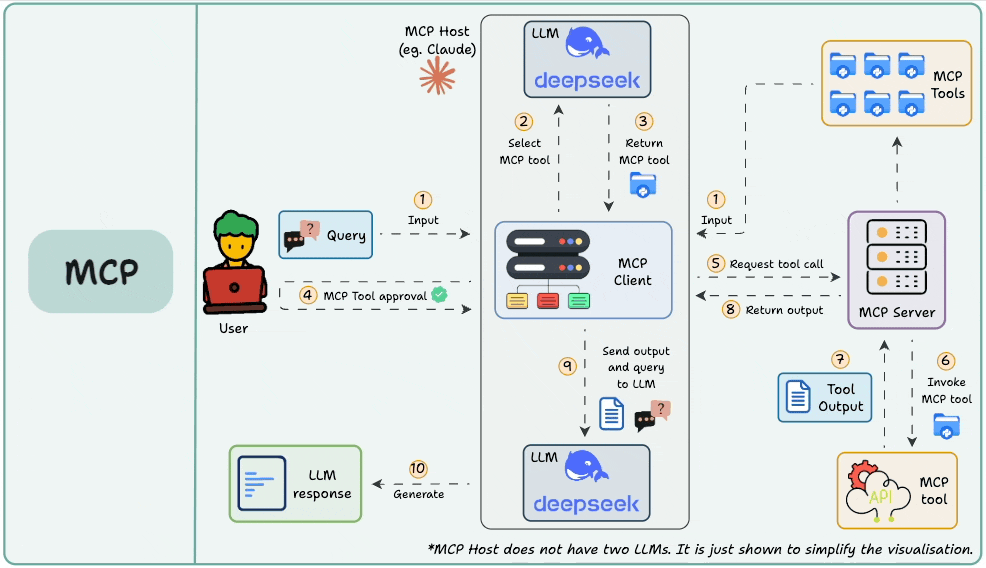
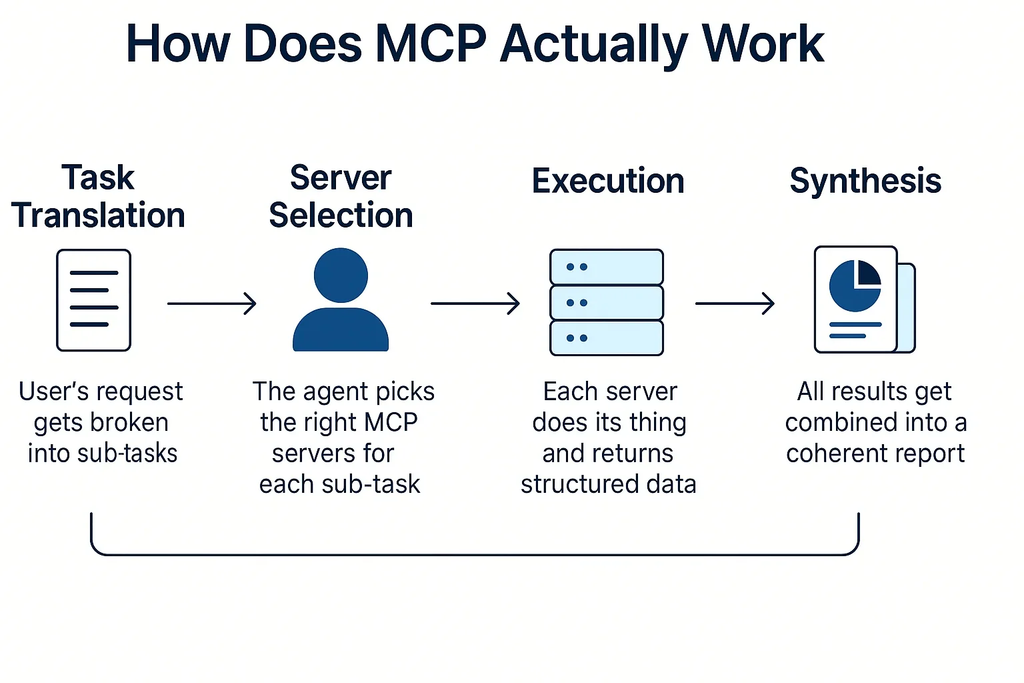
At a high level, an MCP workflow involves an MCP host, an MCP client, and one or more MCP servers.
A simplified flow looks like this:
- The user gives an AI application a task.
- The AI application determines that it needs external information or an action.
- The MCP client communicates with an MCP server.
- The server exposes available capabilities.
- The AI application selects an appropriate tool or resource.
- The MCP server performs the requested operation.
- The result is returned to the AI application.
- The model uses that result to continue the task.
For example, imagine asking an AI coding assistant:
“Check our open GitHub issues and summarize the three most urgent bugs.”
The AI may need to:
Understand request → access GitHub → retrieve issues → analyze them → produce summary
An MCP server can provide the connection to GitHub.
The AI does not need GitHub’s entire internal architecture inside its context. It interacts with the capabilities exposed through the MCP server.
MCP Hosts, Clients and Servers Explained
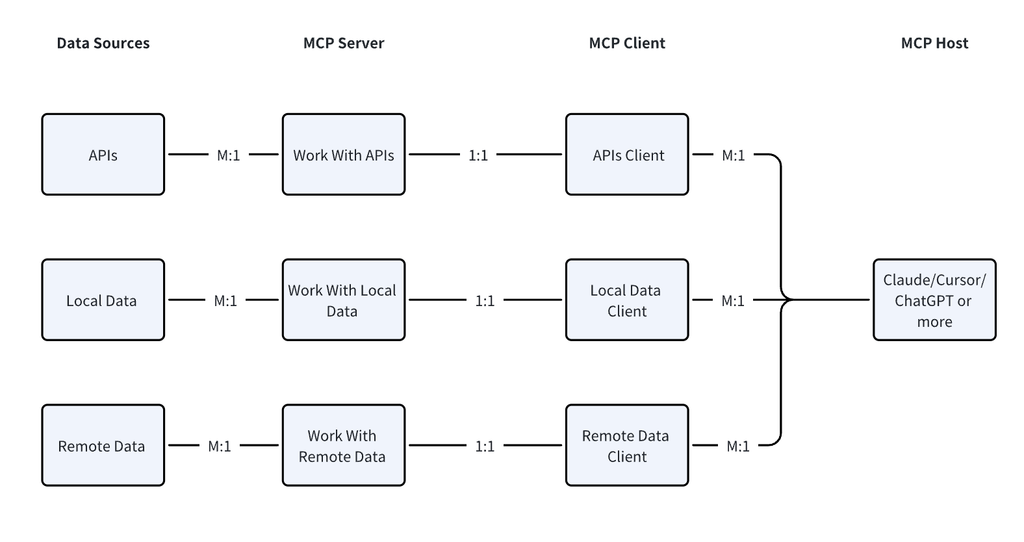
These three terms are easy to mix up.
What Is an MCP Host?
The host is the AI application that wants to use MCP capabilities.
Examples can include an AI assistant, coding environment, or agent application.
The host manages the overall AI experience and can create MCP client connections to servers.
What Is an MCP Client?
The MCP client is the component responsible for communicating with an MCP server.
You can think of it as the connector inside the host application.
A host can potentially connect to multiple MCP servers through MCP clients.
What Is an MCP Server?
The MCP server exposes capabilities that an AI application can use.
Those capabilities might involve:
- Calling an external API
- Searching documents
- Reading data
- Querying a database
- Accessing files
- Performing an action
- Providing reusable prompts
An MCP server does not have to be a massive cloud platform. It can be a relatively small program that exposes a useful set of capabilities.
Anthropic’s initial MCP ecosystem included examples for systems such as GitHub, Google Drive, Slack, Postgres, Git, and Puppeteer.
MCP Tools, Resources and Prompts
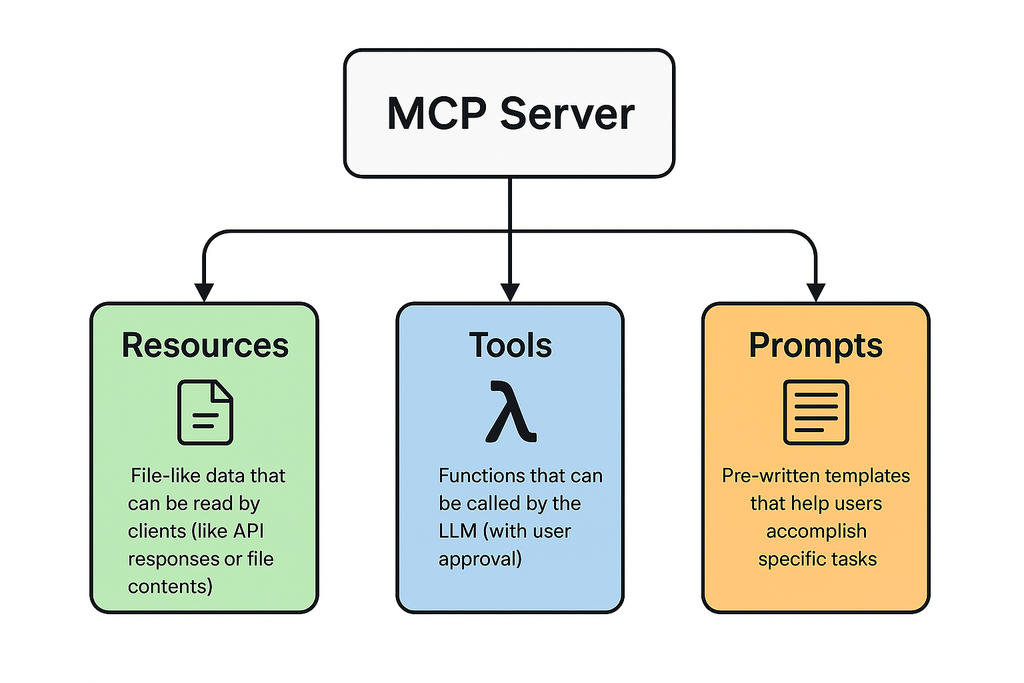
One of the most important parts of understanding MCP is knowing what an MCP server can expose.
MCP Tools
Tools are actions an AI application can invoke.
For example:
- Search GitHub issues
- Create a calendar event
- Query a database
- Search a knowledge base
- Send a message
- Create a ticket
Tools are especially important for agentic workflows because they allow an AI system to move beyond generating text and actually interact with external systems.
OpenAI’s current documentation, for example, supports connecting agents to remote MCP servers and having those servers publish tool definitions that the agent can call.
MCP Resources
Resources provide information or context to an AI application.
Think of them as data that an application can access through the protocol.
A resource could represent information from a documentation system, database, file system, or another source.
The key distinction is simple:
Tools generally let an agent do something.
Resources generally let an agent access information.
MCP Prompts
MCP can also expose reusable prompts.
These can help standardize how an AI application approaches particular tasks.
For example, an organization might create a reusable prompt for:
- Reviewing code
- Summarizing customer feedback
- Analyzing support tickets
- Reviewing documentation
This can make certain workflows easier to reuse across applications.
MCP Transport and Communication
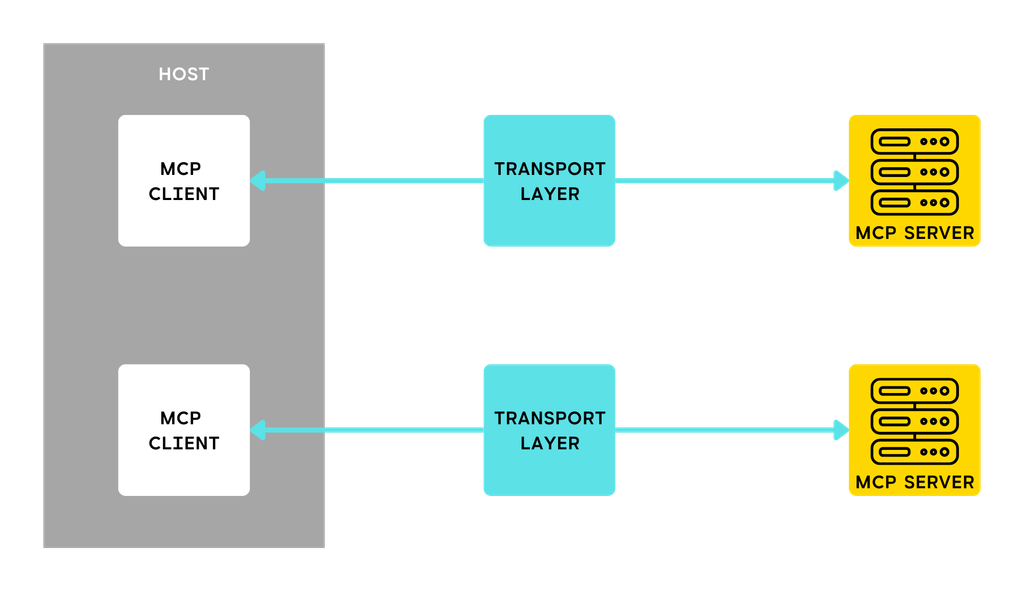
There is another layer developers need to understand: how the client and server communicate.
MCP implementations can operate in local or remote environments, depending on how the server is deployed and how the client connects.
For example, OpenAI’s current MCP documentation describes connections using HTTP as well as stdio for processes running in an application’s environment.
For a local developer workflow, an MCP server might run as a process on your machine.
For a production application, an MCP server may be hosted remotely and accessed over a network.
This distinction becomes important when you start thinking about:
- Authentication
- Authorization
- Network security
- Deployment
- Monitoring
- Scaling
- Latency
- Reliability
So MCP is not just about writing a server. The way that server is hosted can dramatically affect the architecture around it.
Is MCP the Same as an API?
No.
This is one of the most common MCP misunderstandings.
An API is a general mechanism that allows software systems to communicate.
MCP is a protocol specifically designed around standardized interaction between AI applications and external context/capabilities.
A traditional API might expose endpoints such as:
GET /users
POST /orders
GET /products
An MCP server, on the other hand, can expose AI-oriented capabilities such as tools, resources, and prompts.
The two can also work together.
For example:
AI agent → MCP server → REST API → CRM
In this architecture, the MCP server acts as the AI-facing interface while the existing API remains underneath.
So adopting MCP does not necessarily mean throwing away your existing APIs.
In many cases, MCP can sit on top of existing services.
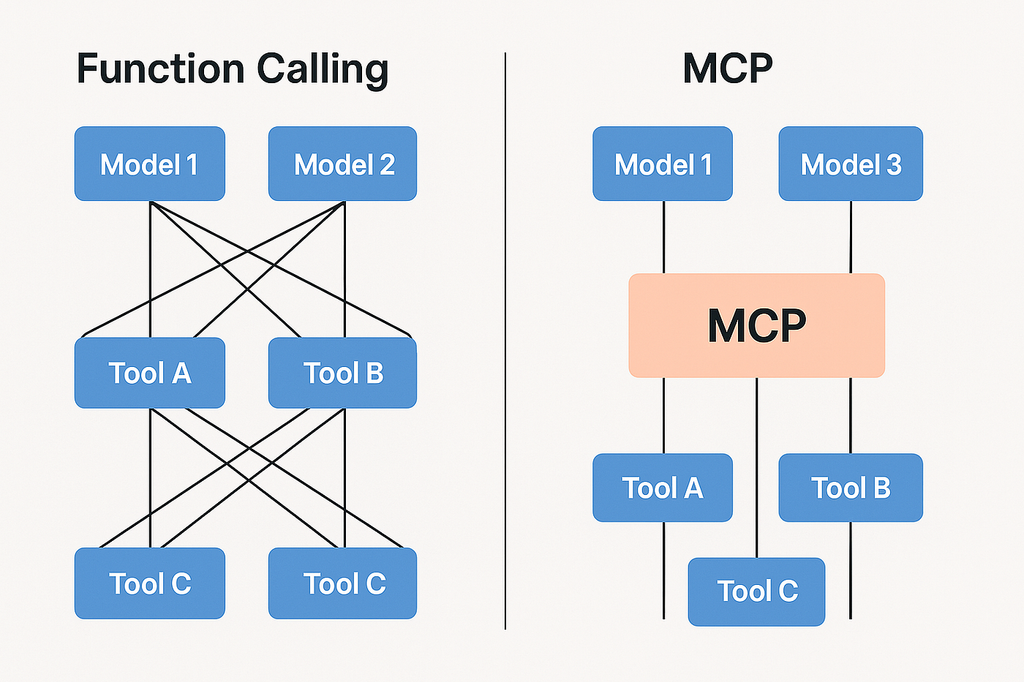
MCP vs Function Calling
This is another area where developers often get confused.
Function calling allows a model to request that your application execute a defined function.
For example:
Model
  ↓
Call get_weather()
  ↓
Your application executes function
  ↓
Weather result
  ↓
Model
MCP addresses a broader interoperability problem.
Instead of every AI application implementing every tool integration independently, an MCP server can expose standardized capabilities that compatible clients can discover and use.
A useful way to think about it is:
Function calling = a mechanism for models to request tool execution.
MCP = a standardized protocol for connecting AI applications with external tools and context.
They are not mutually exclusive.
In fact, modern AI platforms can use both. OpenAI’s documentation lists function calling and remote MCP among several ways developers can extend model capabilities.
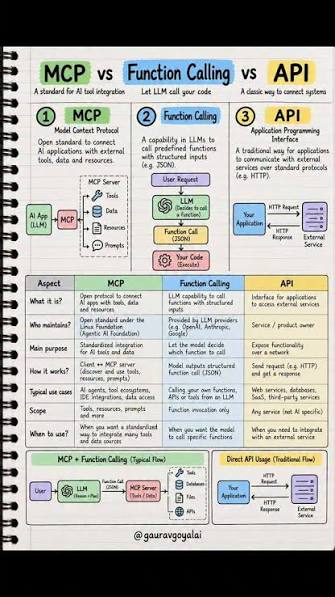
MCP vs APIs vs Function Calling
| Feature | APIs | Function Calling | MCP |
|---|---|---|---|
| Main purpose | Software-to-software communication | Model-to-application tool requests | AI-to-tool/context interoperability |
| Standardized tool discovery | Usually application-specific | Usually developer-defined | Yes, through MCP |
| Designed specifically for AI | No | Yes | Yes |
| Can access external systems | Yes | Through your application | Yes |
| Can expose tools | Via endpoints | Functions/tools | MCP tools |
| Can provide resources/context | Yes, depending on API | Usually indirectly | Yes |
| Reusable across compatible AI clients | Depends on implementation | Usually limited | Designed for interoperability |
| Replaces traditional APIs? | — | No | No |
The important takeaway is that these technologies can work together rather than compete.
Real-World MCP Use Cases
MCP becomes much easier to understand when you stop thinking about the protocol itself and look at what it enables.
1. AI Coding Assistants
An AI coding assistant could use MCP to interact with:
- GitHub
- Documentation
- Issue trackers
- Databases
- Local development tools
This can turn an assistant from a code generator into something that can work with a real development environment.
2. Company Knowledge Assistants
Imagine asking:
“Find our latest product requirements and summarize the changes.”
An MCP-connected assistant could potentially access the organization’s approved knowledge sources rather than relying only on information included in the prompt.
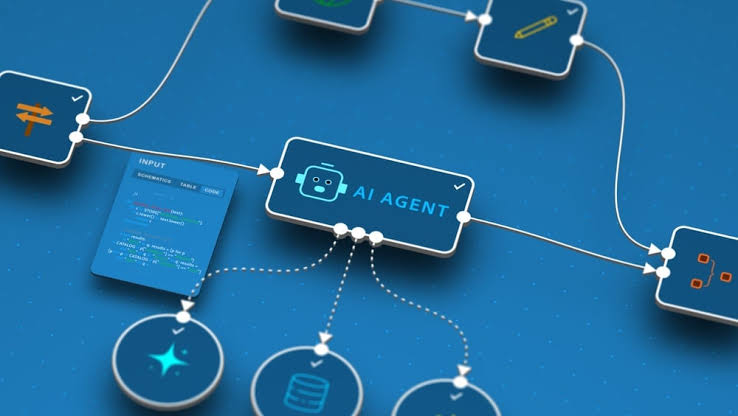
3. Database Agents
An AI agent could use an MCP server to interact with a database.
For example:
“Show me last month’s highest-selling products.”
The agent could use an MCP tool to retrieve the relevant information.
This is powerful—but it also demonstrates why permissions and safety matter.
4. Customer Support
An AI support agent could potentially access:
- Customer records
- Knowledge bases
- Order information
- Support tickets
The model handles reasoning while the connected systems provide the necessary information and actions.
5. Developer Automation
An agent could coordinate several development tools:
GitHub → CI/CD → documentation → issue tracker
Instead of manually copying information between systems, an agent can use connected tools as part of a workflow.
What Does an MCP Workflow Look Like?
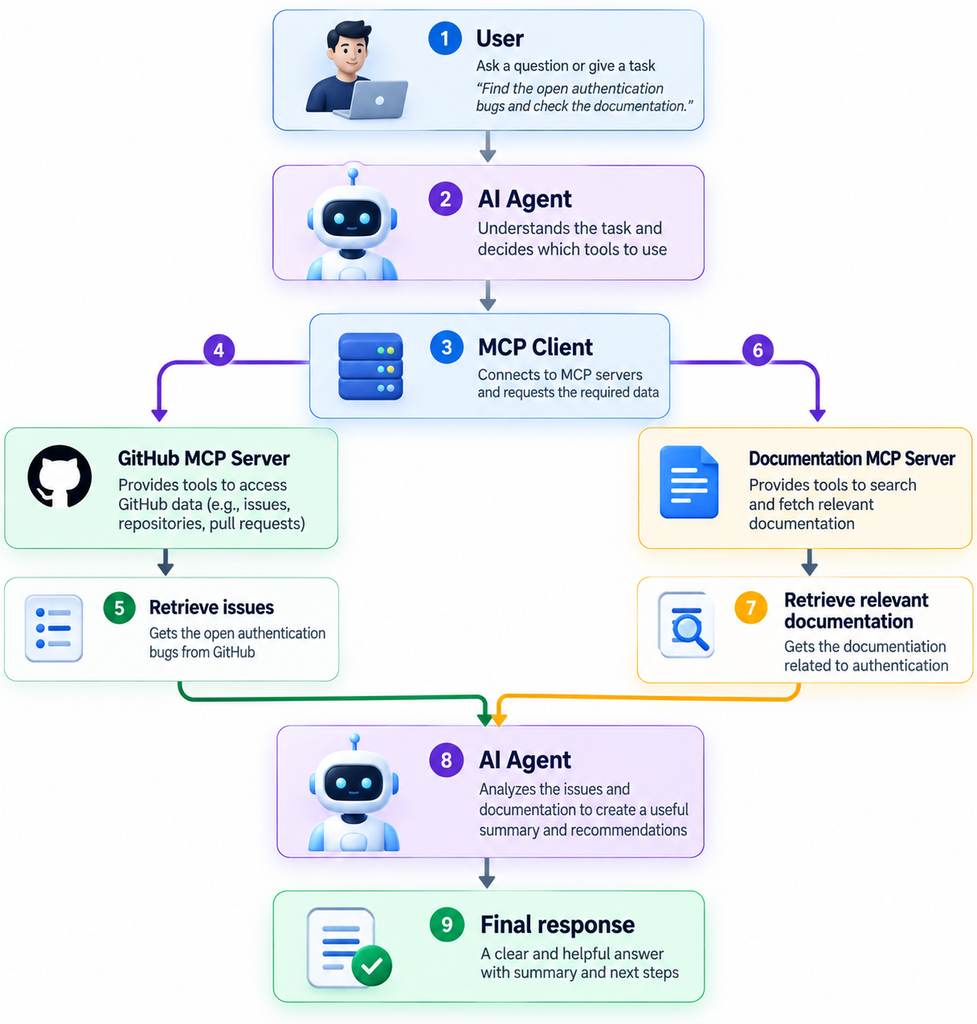
Consider this request:
“Find the open authentication bugs in our GitHub repository, check the relevant documentation, and summarize what needs to be fixed.”
A simplified workflow might look like:
User
↓
AI Agent
↓
MCP Client
↓
GitHub MCP Server
↓
Retrieve issues
↓
Documentation MCP Server
↓
Retrieve relevant documentation
↓
AI Agent
↓
Analyze information
↓
Final response
The interesting part is that the model is not expected to magically know everything.
It can use external capabilities when it needs them.
That is one of the major ideas behind modern agentic AI.
Is MCP Secure?
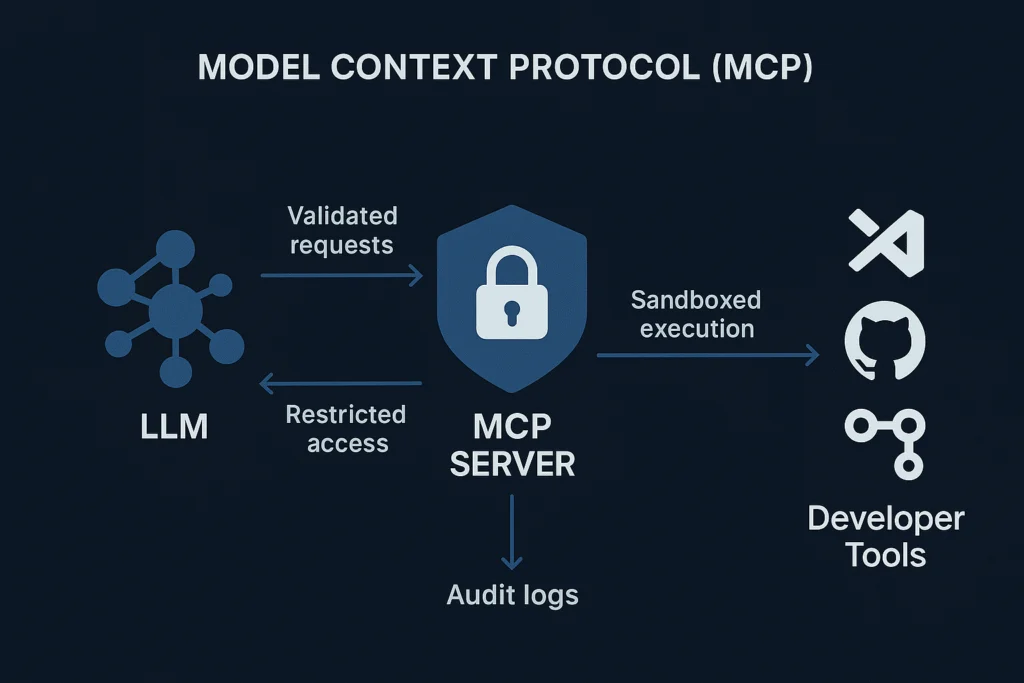
MCP itself should not be treated as a magic security layer.
Connecting an AI system to external tools creates new security considerations.
An MCP implementation should carefully consider:
- Authentication
- Authorization
- Least-privilege access
- Credential management
- Input validation
- Output validation
- Tool permissions
- Audit logging
- Rate limiting
- Human approval for sensitive actions
For example, giving an AI agent read-only access to a database is very different from allowing it to execute arbitrary destructive SQL.
The same principle applies to other systems.
An AI agent that can read GitHub issues has a different risk profile from an agent that can delete repositories or merge production code.
This is why MCP deployments should be designed around clear permissions and trust boundaries.
The ecosystem has also been moving toward more production-oriented infrastructure, including identity, asynchronous operations, statelessness and an official registry.
How to Get Started With MCP
If you are new to MCP, don’t begin by trying to build a huge multi-agent platform.
Start small.
Step 1: Understand the architecture
Learn the difference between:
- Host
- Client
- Server
- Tool
- Resource
- Prompt
Once these concepts make sense, MCP becomes much less intimidating.
Step 2: Run an existing MCP server
Using an existing server is often easier than immediately building your own.
This lets you understand how the client-server interaction works.
Step 3: Build a simple MCP server
Create one useful capability.
For example:
search_documents
or
get_customer
or
search_github_issues
Start with a small, clearly defined tool.
Step 4: Connect it to an AI application
Use a compatible AI client or agent framework and test the complete workflow.
Step 5: Add security
Once the basic workflow works, think about authentication, permissions, validation, logging, and failure handling.
Step 6: Move toward production
For production systems, consider:
- Remote deployment
- HTTPS
- Authentication
- Authorization
- Monitoring
- Rate limits
- Error handling
- Tool discovery
- Performance
- Secrets management
Modern AI platforms are already incorporating MCP directly into agent workflows. OpenAI’s current documentation, for example, supports remote MCP servers through its Responses API and Agents ecosystem.
Frequently Asked Questions About MCP
What does MCP stand for?
MCP stands for Model Context Protocol. It is an open protocol designed to standardize how AI applications connect to external tools and data.
What is an MCP server?
An MCP server is a program or service that exposes capabilities such as tools, resources, and prompts to compatible MCP clients.
Is MCP an API?
Not exactly. MCP is a protocol for AI-oriented interoperability. An MCP server can, however, connect to or wrap existing APIs.
Is MCP the same as function calling?
No. Function calling is a mechanism for a model to request execution of a function. MCP provides a standardized protocol for connecting AI applications with external tools and context.
Can MCP connect to databases?
Yes. An MCP server can expose database-related capabilities, such as querying approved data, depending on how the server is implemented and secured.
Can MCP work with remote servers?
Yes. MCP can be used with remote server deployments. Current OpenAI documentation, for example, supports remote MCP connections over HTTP.
Does MCP replace REST APIs?
No. REST APIs remain useful for general software integration. MCP can instead provide an AI-friendly interoperability layer that works with existing services and APIs.
Is MCP only for Claude?
No. MCP originated at Anthropic, but it is an open protocol and has expanded beyond Anthropic’s products. Current OpenAI developer documentation also supports MCP connections.
Why is MCP important for AI agents?
AI agents increasingly need access to external tools, data, and systems. MCP provides a standardized way to expose those capabilities, reducing the need for every AI application to build every integration independently.
Should every AI application use MCP?
Not necessarily. MCP is useful when standardized access to external tools and context provides value. A simple application may not need the additional architecture.
Final Takeaway
MCP is best understood as a connectivity and interoperability layer for AI applications.
It does not replace AI models.
It does not replace APIs.
And it is not simply another name for function calling.
Instead, MCP gives developers a standardized way to connect AI applications with external tools, resources, and prompts.
That becomes increasingly valuable as AI systems move from answering questions to actually doing things.
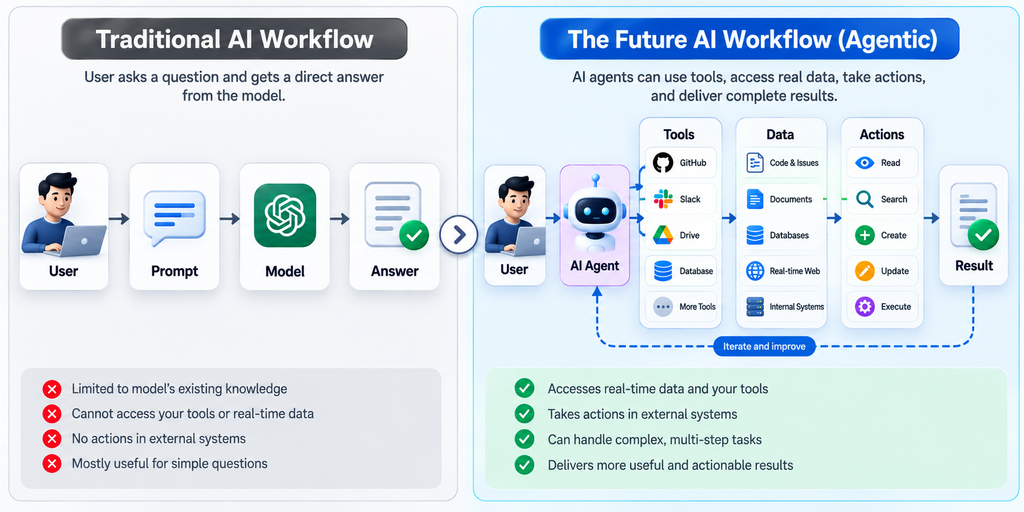
MCP is one of the protocols helping make that transition easier to build.
And that is ultimately why developers should pay attention to it: the smarter AI becomes, the more important its connections to the real world become.