Ransomware-as-a-Service attacks are a growing cybersecurity concern for businesses of every size. By combining strong authentication, secure backups, regular software updates, and employee awareness, organizations can reduce their risk and recover more effectively from an attack.
Ransomware-as-a-Service (RaaS) is a cybercrime model in which ransomware developers provide tools or infrastructure to affiliates who carry out attacks. Businesses can reduce their exposure by securing employee accounts, patching vulnerable systems, maintaining isolated backups, monitoring networks, and preparing a tested incident response plan.
The risk remains current. In October 2026, CISA, the FBI, and international partners issued a warning about SafePay ransomware, reporting at least 600 affected organizations since August 2024. The advisory highlighted compromised credentials, vulnerable internet-facing systems, phishing, data theft, and file encryption among the risks businesses should prepare for. Read the official CISA SafePay ransomware advisory for details and recommended mitigations.
For companies that depend on digital systems to serve customers and operate daily, ransomware protection is not just an IT responsibility. It is a business continuity priority.
What Is Ransomware-as-a-Service attacks?
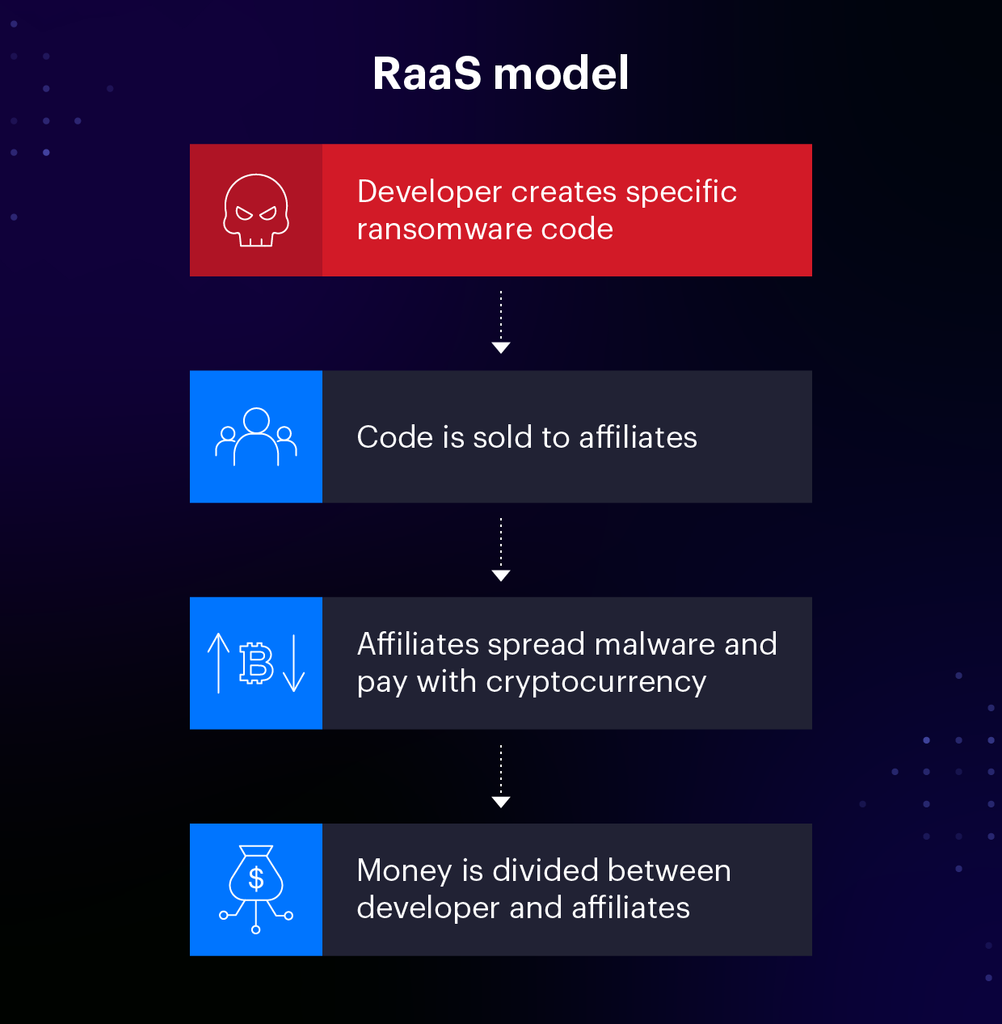
Ransomware-as-a-Service is a model that allows cybercriminals to use ransomware tools, services, or infrastructure developed by others. The developers may provide malware, payment portals, negotiation services, or other capabilities, while affiliates conduct the intrusions and deploy the attacks.
The arrangement resembles a criminal service business: different participants handle different parts of an attack, and profits may be shared. This can lower the technical barrier for some attackers and allow campaigns to reach more organizations.
A typical attack may involve several stages:
- Initial access: An attacker steals credentials, tricks an employee into opening a malicious link, or exploits a vulnerable system.
- Account compromise: The attacker attempts to gain access to additional accounts or obtain higher privileges.
- Network movement: The attacker explores connected devices and systems to find valuable data.
- Data theft: Sensitive information may be copied before encryption.
- Encryption and disruption: Files or systems become inaccessible.
- Extortion: The victim receives a demand for payment, sometimes alongside a threat to publish stolen information.
Not every ransomware incident follows the same sequence. Some attacks focus on encryption, while others rely heavily on stealing data and threatening to expose it.
This is why businesses need more than a single antivirus product. They need several layers of protection that can prevent access, detect suspicious behavior, limit damage, and support recovery. The CISA StopRansomware resource hub provides additional prevention and response guidance.
Why RaaS Is a Serious Business Risk
Ransomware can interrupt operations even when a company has not lost its entire network. If a business cannot access order systems, accounting records, shared files, or customer databases, everyday work can quickly grind to a halt.
The consequences may include:
- Operational downtime: Employees may be unable to use essential systems.
- Financial losses: Recovery, investigation, legal advice, and business interruption can all cost money.
- Data exposure: Stolen personal or confidential information may create additional risks.
- Customer trust: Customers and business partners may question whether their data is safe.
- Compliance obligations: Depending on the data and jurisdiction, a breach may trigger reporting or notification requirements.
- Recovery uncertainty: Paying a ransom does not guarantee that files will be restored or stolen data deleted.
Smaller companies are not automatically safe because they have fewer employees or less data. They may rely on cloud applications, remote access tools, external IT providers, and shared accounts—each of which needs appropriate protection.
The goal is not to assume every business will be attacked. It is to make an attack harder to carry out and less damaging if prevention fails.
What Recent Ransomware Warnings Tell Us
The October 2026 SafePay advisory is a useful reminder that ransomware groups can target organizations across different industries and regions.
According to the joint advisory from CISA, the FBI, the U.S. Secret Service, and international partners, SafePay actors have used methods including compromised credentials, brute-force password attacks, phishing, and exploitation of vulnerabilities in internet-facing systems. Authorities also described data theft and encryption as part of the group’s extortion activity. Ransomware-as-a-Service attacks
The recommended defenses are practical rather than mysterious: update exposed systems, strengthen account security with multifactor authentication, restrict administrative privileges, maintain offline backups, and segment networks.
These recommendations are not limited to defending against SafePay. They are broadly useful controls for reducing ransomware risk. Ransomware-as-a-Service attacks
Businesses can read the official CISA SafePay advisory for technical details and mitigation guidance.
10 Ways Businesses Can Defend Against RaaS Attacks
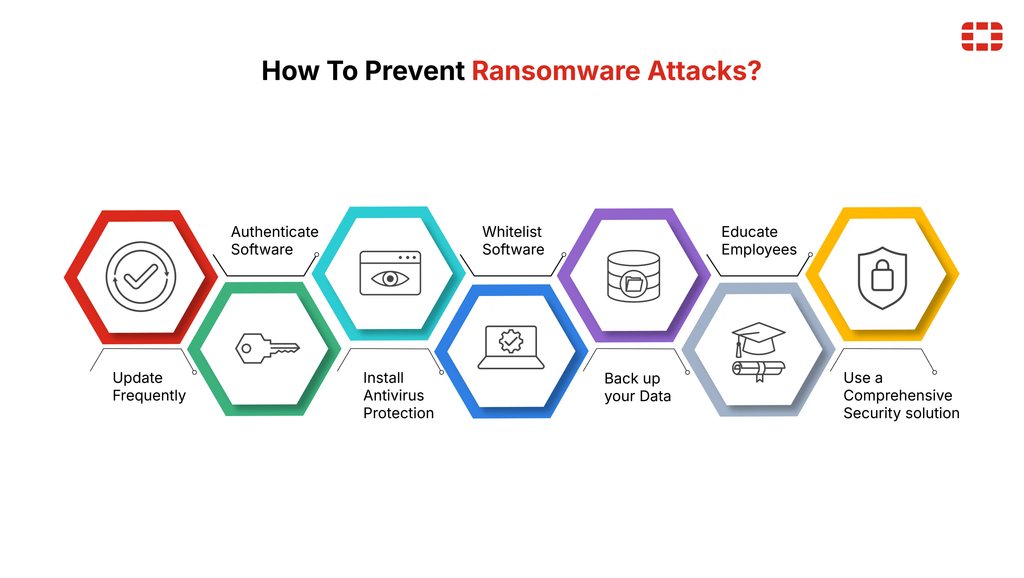
1. Protect accounts with multifactor authentication
A stolen password should not be enough to access critical company systems.
Enable multifactor authentication (MFA) for email, remote access, cloud services, administrator accounts, and other important applications. Where available, prefer phishing-resistant methods such as passkeys or hardware security keys.
Businesses should also:
- Require unique passwords and use a reputable password manager.
- Remove accounts when employees or contractors leave.
- Review access permissions regularly.
- Secure administrator and recovery accounts carefully.
- Monitor unusual login attempts and unexpected account changes.
MFA is not a complete solution, but it can make stolen passwords less useful to attackers. Microsoft’s multifactor authentication documentation explains how MFA adds another layer of account protection.
2. Patch vulnerabilities before attackers exploit them
Outdated software can expose systems to known security weaknesses. Attackers often look for vulnerable internet-facing devices, including VPN gateways, firewalls, remote access systems, and public-facing servers. Ransomware-as-a-Service attacks
Create an inventory of company hardware and software, including devices managed by third parties. Track vendor security advisories and prioritize vulnerabilities known to be exploited in the wild.
A practical patching process should include:
- Identifying affected assets.
- Assessing exposure and business impact.
- Applying security updates promptly.
- Testing important systems after updates.
- Documenting exceptions and compensating controls.
Do not assume that a device is safe simply because it is still functioning normally. A vulnerable system may operate as expected while remaining exposed.
3. Maintain offline and immutable backups
Backups can be the difference between a manageable disruption and a prolonged business crisis. However, backups are only useful if they are available and can be restored.
Use a backup strategy that includes protected copies separated from everyday production systems. Depending on your environment, this may involve offline media, immutable cloud storage, or other access-controlled backup destinations. Ransomware-as-a-Service attacks
Follow these practices:
- Back up critical data on a defined schedule.
- Protect backup accounts with strong authentication.
- Separate backup administration from normal user accounts.
- Restrict who can delete or change backup copies.
- Test restoration regularly.
- Document recovery priorities and acceptable downtime.
A backup job reporting “successful” is not proof that the business can recover. Test the actual process of restoring files, applications, and essential services. The CISA StopRansomware Guide provides further recommendations for preparing for and recovering from ransomware.
4. Segment your network
Network segmentation divides an organization’s systems into separate areas with controlled connections between them.
Without suitable boundaries, an attacker who compromises one workstation may be able to reach shared drives, servers, backup systems, or administrative services. Segmentation helps limit those opportunities.
For example, a business can separate employee devices, production servers, guest Wi-Fi, payment systems, and backup infrastructure. Access between these areas should be limited to what is genuinely required.
Segmentation is especially important for organizations with multiple offices, remote workers, sensitive customer information, or critical operational technology.
5. Train employees to recognize phishing
Phishing messages often imitate trusted colleagues, vendors, delivery services, or software providers. A convincing email may ask an employee to open an attachment, sign in to a fake page, or approve an unexpected request.
Training should explain what suspicious messages look like and how employees can report them quickly. Use realistic examples and repeat the training periodically instead of relying on a single annual presentation.
Encourage employees to:
- Verify unusual payment or password requests through a separate channel.
- Avoid opening unexpected attachments or links.
- Report suspicious messages without fear of blame.
- Confirm unexpected changes to vendor bank details.
- Contact IT if a link was opened or credentials were entered.
Technology controls such as email filtering and attachment scanning remain important. Employee training works best as one layer of a broader defense.
6. Limit administrator privileges
Every account with broad permissions can become a valuable target. If attackers compromise an administrator account, they may gain greater control over systems, user accounts, and security settings.
Give employees only the access needed for their roles. Use separate administrator accounts for administrative tasks, protect privileged access with strong authentication, and review permissions periodically.
Where feasible, grant elevated privileges only for the time required to complete a task. Monitor sensitive changes, including the creation of new administrator accounts and modifications to security controls.
Restricting privileges can help reduce how far an attacker moves after gaining an initial foothold.
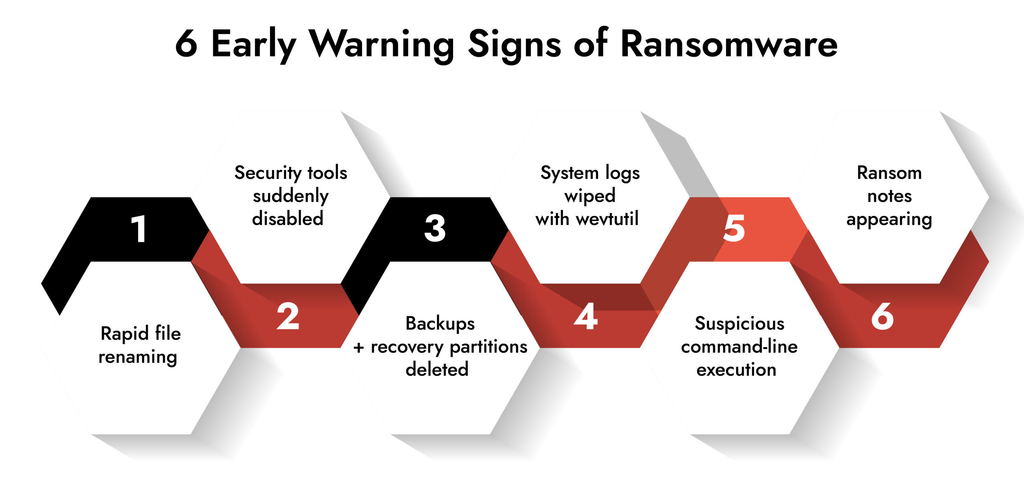
7. Monitor systems for suspicious activity
Prevention controls can fail, so businesses also need to identify unusual behavior quickly.
Security monitoring may include endpoint detection and response (EDR), centralized logging, identity alerts, email security, and network monitoring. Smaller organizations without an in-house security team may consider a managed security service provider. Ransomware-as-a-Service attacks
Pay attention to activity such as:
- Unexpected administrator account creation.
- Unusual access to large numbers of files.
- Security tools being disabled without authorization.
- Unfamiliar remote access activity.
- Large or unusual transfers of company data.
- Changes to backup policies or recovery settings.
No single alert proves that a ransomware attack is underway. Investigate signals in context and establish a process for escalating suspicious activity.
8. Secure remote access and third-party connections
Remote access is necessary for many modern businesses, but exposed services and poorly managed vendor accounts can increase risk.
Disable remote access services that are not needed. Require MFA, restrict access to trusted devices or networks where appropriate, and keep VPNs and remote management tools patched.
Review third-party access before granting it. Vendors should receive only the permissions necessary for their work, and their access should be removed when it is no longer required.
Businesses should also know which service providers can access their systems and how those providers will respond if a security incident occurs. Ransomware-as-a-Service attacks
9. Prepare an incident response plan
A ransomware incident is a poor time to decide who has authority to shut down a server, contact customers, or coordinate with legal advisers.
Create a written incident response plan that defines responsibilities, escalation paths, communication channels, and recovery priorities.
Include contacts for IT and security teams, leadership, legal counsel, relevant service providers, insurers where applicable, and authorities. Keep an accessible copy of the plan outside the systems that could be affected.
Practice the plan through tabletop exercises. Simulate scenarios such as a compromised administrator account, unavailable file servers, or a suspected data breach. The purpose is to discover gaps before a real incident exposes them.
The NIST Computer Security Incident Handling Guide offers established guidance on preparing for, detecting, analyzing, containing, and recovering from security incidents. Ransomware-as-a-Service attacks
10. Test your defenses and improve continuously
Cybersecurity is not a one-time setup. Systems change, employees join and leave, new vulnerabilities emerge, and attackers adjust their methods.
Review your security controls regularly and test whether they work as expected. Useful activities include restoring backups, reviewing access permissions, validating endpoint protection, testing incident response procedures, and conducting authorized security assessments.
Use the results to prioritize improvements based on business risk. Ransomware-as-a-Service attacks A small organization may need to focus first on MFA, patching, protected backups, and account management before investing in more advanced tools.
The important thing is to make security a repeatable process with clear owners and measurable follow-up actions.
What Should a Business Do During a Ransomware Incident?
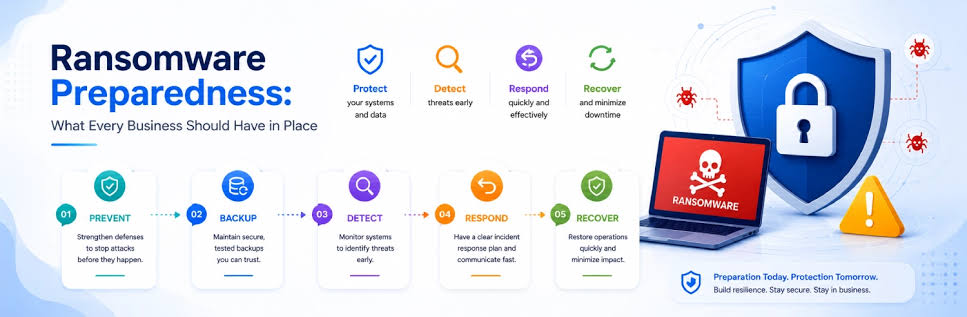
If you suspect ransomware, act quickly but avoid making rushed decisions that could destroy evidence or complicate recovery.
- Activate your incident response plan. Notify the designated security or IT lead and the appropriate decision-makers.
- Contain affected systems. Isolate compromised devices from the network where safe and appropriate. Do not reconnect them simply because the screen appears normal.
- Protect unaffected systems. Review access to shared drives, administrator accounts, cloud services, and backups. Coordinate containment with qualified incident responders.
- Preserve evidence. Keep ransom notes, relevant logs, suspicious emails, timestamps, and other incident details. Avoid wiping affected systems before responders have assessed the situation.
- Investigate the scope. Determine which accounts, devices, applications, and data may have been accessed, stolen, or encrypted.
- Contact appropriate experts and authorities. Depending on your location and circumstances, notify law enforcement, your incident response provider, insurer, and legal advisers.
- Restore systems carefully. Use verified clean backups and address the original access method before returning systems to service.
- Review notification obligations. Consult qualified legal or privacy professionals about any required reporting to regulators, customers, or affected individuals.
Should businesses pay the ransom?
Paying does not guarantee that a business will receive working decryption tools, recover all its files, or prevent stolen information from being published. It may also encourage further criminal activity. Ransomware-as-a-Service attacks
The FBI advises against paying ransoms. Businesses facing an incident should seek guidance from experienced incident responders, legal counsel, and relevant authorities before making decisions. They should also consider applicable legal restrictions and sanctions.
For additional guidance, review the FBI’s ransomware resources.
Ransomware Protection Checklist for Businesses
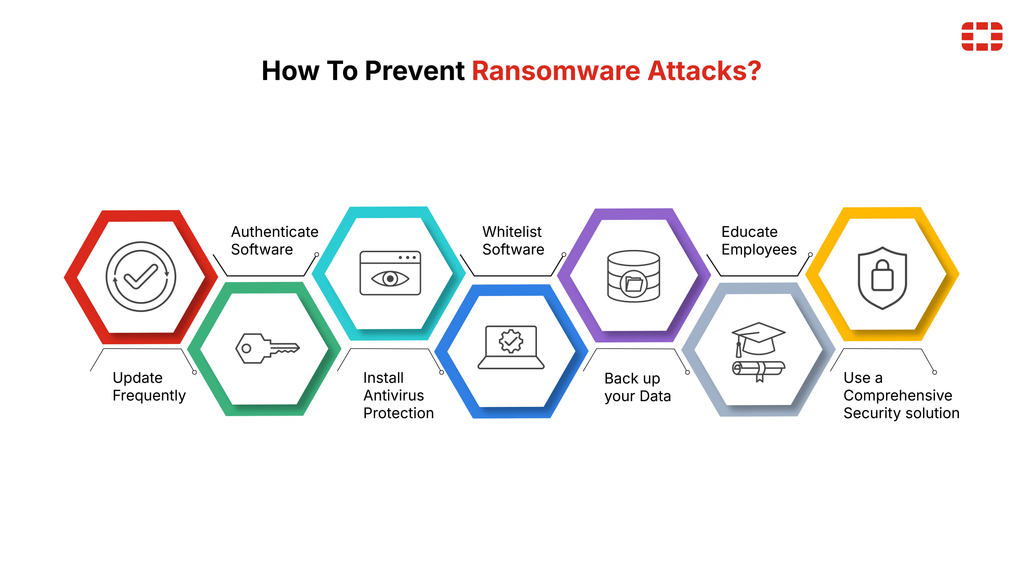
Use this checklist to review your organization’s current readiness.
- MFA enabled for email, remote access, cloud services, and administrator accounts.
- Critical operating systems, applications, VPNs, and firewalls patched.
- Offline or immutable backups maintained and restoration tested.
- Network access restricted between sensitive systems.
- Employee phishing awareness and reporting processes established.
- Administrator permissions reviewed and limited.
- Security alerts and logs monitored.
- Third-party and remote access reviewed.
- Written incident response plan documented and tested.
- Recovery priorities and external contacts available outside the main network.
If you cannot check every box, do not panic. Start with the controls that reduce the greatest immediate risk: account security, patching exposed systems, reliable backups, and a clear response plan. Ransomware-as-a-Service attacks
Frequently Asked Questions
What is a Ransomware-as-a-Service attack?
A Ransomware-as-a-Service attack uses a criminal business model in which developers provide ransomware tools or infrastructure to affiliates who carry out attacks. Victims may face encrypted files, stolen data, operational disruption, and demands for payment.
Can small businesses be targeted by RaaS groups?
Yes. Small businesses can be exposed through phishing, stolen credentials, vulnerable systems, and insecure remote access. Limited IT resources can make it harder to detect attacks and recover quickly, so basic protections are particularly important.
What is the most effective defense against ransomware?
There is no single control that stops every attack. A strong baseline combines multifactor authentication, timely patching, protected and tested backups, network segmentation, least-privilege access, monitoring, and incident response preparation.
Do backups guarantee recovery from ransomware?
No. Backups can also be deleted, encrypted, inaccessible, or incomplete. Businesses should isolate backup copies from production systems, protect backup administration, and regularly test restoration.
Does antivirus software prevent RaaS attacks?
Antivirus and endpoint security tools can detect or block some malicious activity, but they cannot guarantee prevention. They should be combined with identity security, patch management, network controls, monitoring, and recovery planning.
Should a business pay a ransomware demand?
Payment does not guarantee recovery or prevent stolen data from being published. Businesses should consult incident response professionals, legal counsel, and relevant authorities before making decisions.
How often should businesses test their ransomware recovery plan?
There is no universal schedule for every organization. Critical systems should have a defined recovery-testing schedule based on business risk, regulatory requirements, and how frequently systems change. Testing should verify that data and essential services can actually be restored.
What is double extortion in ransomware?
Double extortion occurs when attackers both encrypt a victim’s data and steal information that they threaten to publish or disclose. This creates pressure even when the victim has working backups.
Conclusion
Ransomware-as-a-Service makes cybercrime more accessible to attackers, but businesses are not powerless. Strong identity controls, timely security updates, isolated backups, network segmentation, and a tested incident response plan can reduce both the likelihood and the impact of an attack.
The latest ransomware warnings reinforce a practical lesson: security should not depend on a single tool or a last-minute response. Build several layers of protection, test them regularly, and make sure everyone knows what to do when something goes wrong.
For business owners, the best time to prepare for ransomware is before an attacker gains access—not after the files stop opening. latest cybersecurity news