
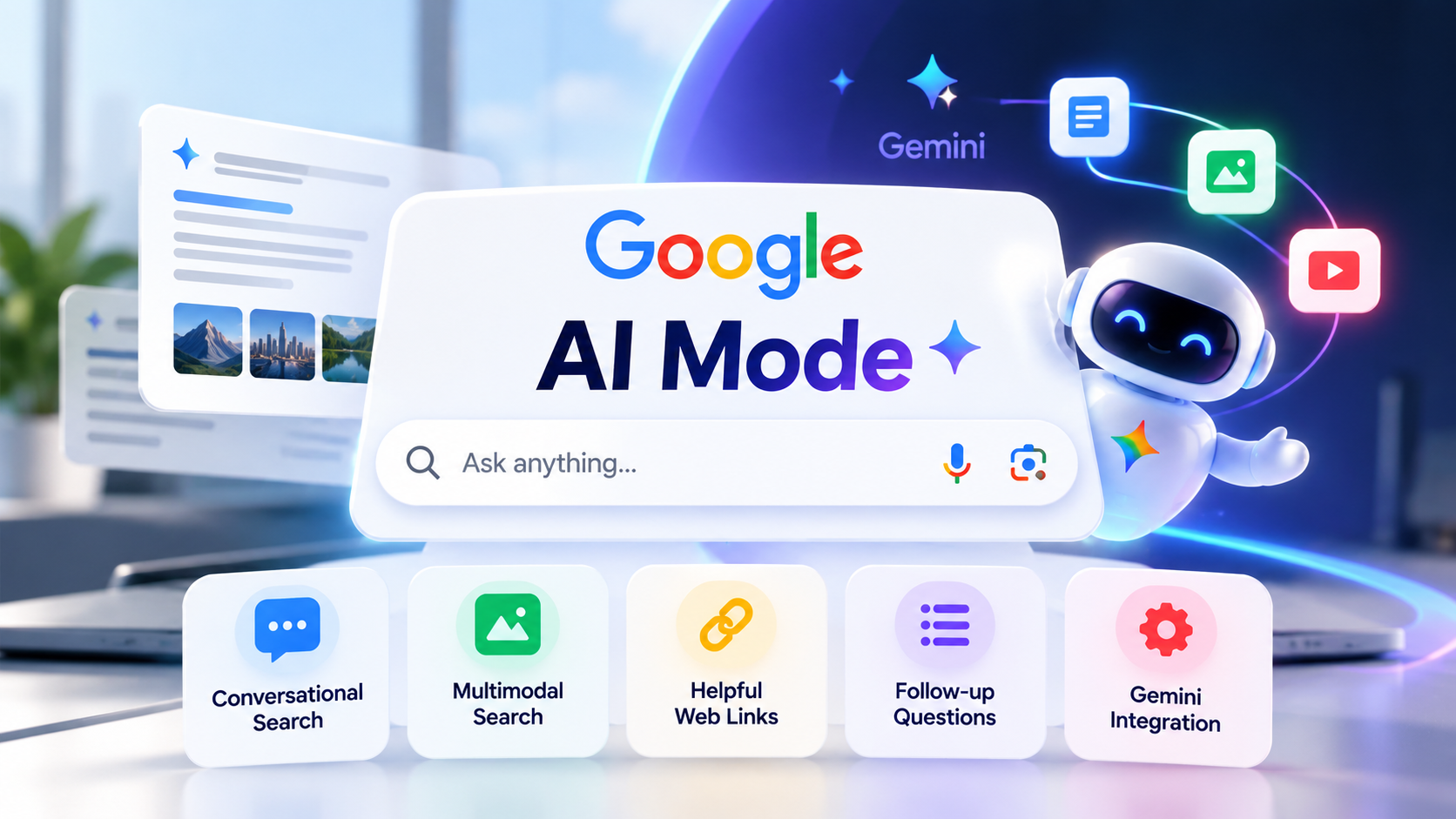
Google Search is evolving beyond a list of blue links. With Google AI Mode, users can ask detailed questions, explore complicated topics through follow-up prompts, and discover useful websites through AI-generated responses. In 2026, Google’s expanding Gemini capabilities are making AI-powered search an important development for students, professionals, businesses, and website owners.
What Is Google AI Mode?
Google AI Mode is an AI-powered search experience that lets users ask questions in natural language and receive an organized response with links to relevant web pages. Instead of searching through several separate queries, users can begin with a detailed question and continue exploring through follow-up questions.
Google describes AI Mode as an experience built around Gemini models, advanced reasoning, and multimodal understanding. It can help users research topics, compare options, explore recommendations, and work through questions that require more than a simple factual answer. Google’s official AI Mode guide explains its core capabilities.
For example, instead of searching for “best laptop for college,” you could ask:
“Compare lightweight laptops for computer science students under my budget, considering battery life, coding performance, portability, and upgrade options.”
You can then ask follow-up questions to narrow down the choices. This conversational approach is one of the main differences between AI Mode and a traditional search query.
Latest Google AI Mode Updates in 2026
Google continues to expand its AI search experience. Its official AI Mode page describes multimodal input, follow-up research, Search Live, personalized responses, and interactive visuals. The features available to an individual user can vary by country, account, and rollout.
A notable development came on October 13, 2026, when Google introduced Gemini 4 Argon for developers and businesses. Reuters reported that eligible Google AI Pro and Ultra subscribers could access the model through the Gemini app and AI Mode in Search. This makes the model relevant to the wider evolution of Google’s AI-powered search ecosystem, although availability depends on the subscription and product experience. Read Reuters’ report on Gemini 4 Argon.
Separately, Google Cloud announced a Gemini agent for work on October 8, 2026, highlighting the company’s broader direction toward AI-assisted tasks and connected productivity tools. That announcement concerns Google’s work-focused products; it should not be confused with every feature available inside Search AI Mode. Read Google’s announcement.
The bigger trend is clear: Google is developing AI experiences that help people move from asking questions to researching, comparing, and completing more complex tasks.
How Does Google AI Mode Work?
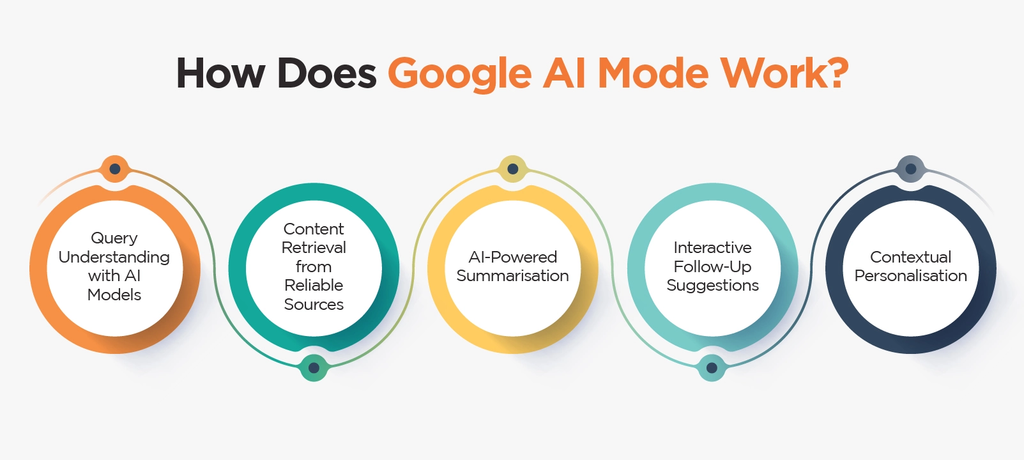
AI Mode uses Google’s search infrastructure alongside generative AI capabilities. When you submit a question, the system can interpret the request, explore related aspects of the topic, and organize information into a response.
Google says AI Mode can break a question into subtopics and search for relevant information across those areas. This approach can be helpful when a question requires multiple perspectives rather than a single fact. The response may include links that allow users to verify information or continue reading from original sources.
A simplified workflow looks like this:
- Ask a detailed question. Include your goal, constraints, budget, or relevant background.
- Review the AI-generated response. Look at the explanation and any cited web links.
- Ask a follow-up question. Request a comparison, clarification, or a deeper explanation.
- Verify important information. Open original sources, especially for medical, financial, legal, or other high-stakes decisions.
- Continue researching. Use the links and follow-up questions to investigate the subject further.
AI Mode is not a guarantee of accuracy. Its responses can contain mistakes, so checking important claims against trustworthy sources remains essential.
Key Features of Google AI Mode
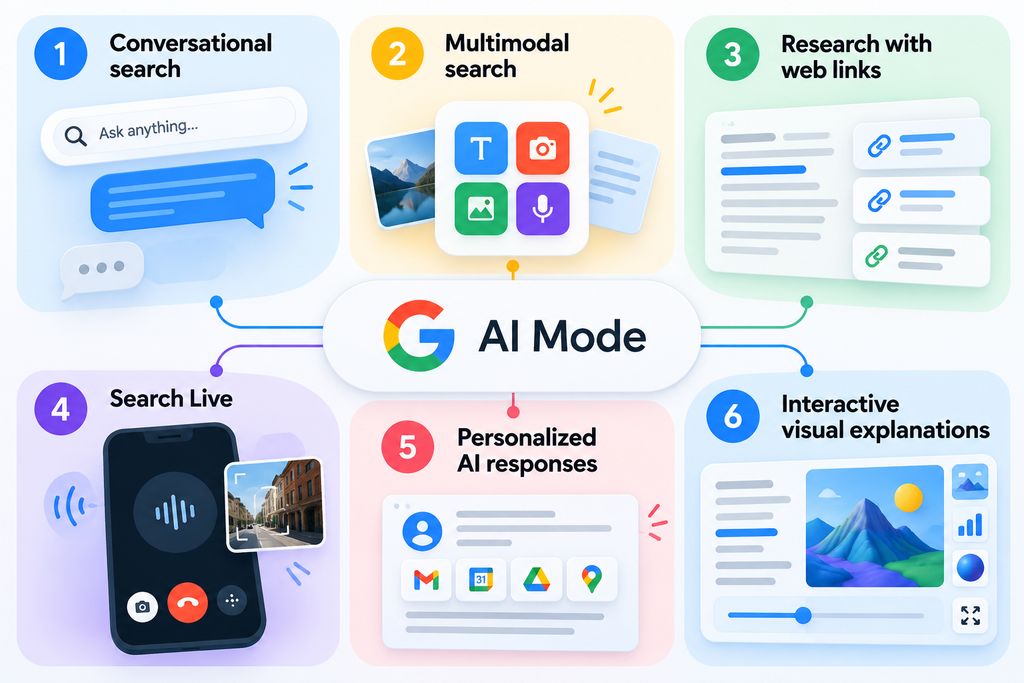
1. Conversational search
Users can ask detailed questions instead of relying only on short keywords. Follow-up prompts help refine a search without starting from scratch every time.
This can be useful for product research, travel planning, learning unfamiliar concepts, and comparing possible solutions.
2. Multimodal search
Google’s AI Mode supports more than typed text. Depending on availability, users can speak a question, take a photo, or upload an image to provide context.
For example, a student could share an image of a diagram and ask for an explanation. A shopper could use a product image to investigate similar items or understand its features.
3. Research with web links
AI Mode organizes information into a readable response and can provide links to relevant websites. Those links matter because they give users a way to check the original context and explore different perspectives.
Readers should not assume that every answer contains every important source. For critical research, compare several reliable sources rather than relying on one summary.
4. Search Live
Google’s AI Mode experience includes Search Live, which supports a more conversational interaction with Search. Google also describes the ability to use video to provide visual context in supported experiences.
This can make search more useful for situations where describing an object or asking a sequence of questions is easier than typing everything.
5. Personalized AI responses
Google describes Personal Intelligence features that can connect selected Google apps to provide responses tailored to a user’s plans and preferences. Access and functionality may vary, and users should review the permissions they grant before connecting personal accounts.
6. Interactive visual explanations
Google says AI Mode can generate interactive visuals and tools for explaining complex concepts. Depending on the query and available features, this may help users explore a concept rather than reading a static explanation alone.
These capabilities can be useful for education, brainstorming, planning, and understanding technical subjects.
How to Use Google AI Mode
Getting better results starts with asking a more specific question.
Step 1: Open Google Search. Visit Google Search and look for the AI Mode option. You can also consult Google’s official AI Mode page.
Step 2: Enter your question. Explain what you want to accomplish. Add useful context such as your experience level, budget, preferred format, or constraints.
Step 3: Review the response. Read the main explanation and inspect the available links. Check whether the answer actually addresses your question.
Step 4: Continue with follow-ups. Ask questions such as “What are the disadvantages?”, “Compare these options in a table,” or “Which sources support this claim?”
Step 5: Verify the final result. Check important facts on official websites and primary sources before acting on them.
If AI Mode is not visible in your account, check Google’s current availability information and any account or product requirements. Features can roll out differently across regions and subscriptions.
Google AI Mode vs Google AI Overviews
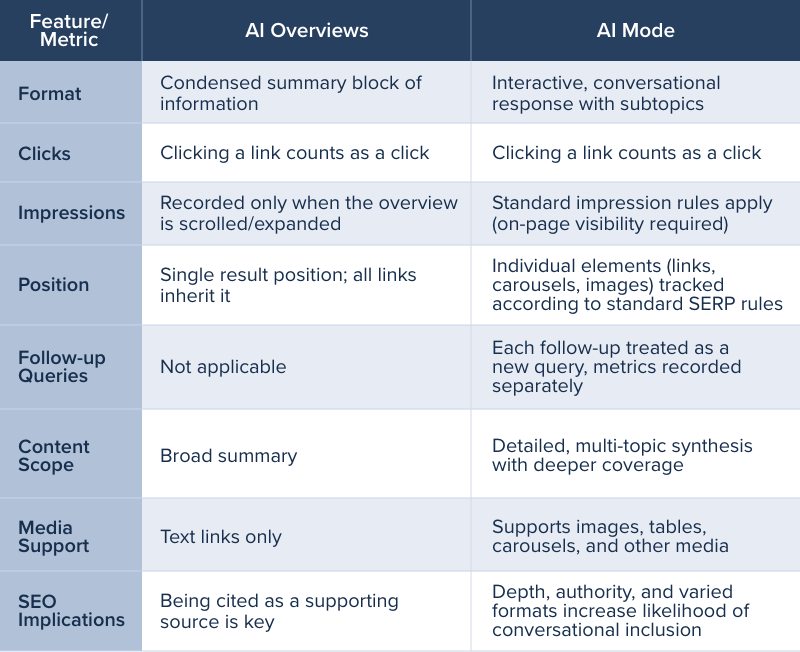
Google AI Mode and AI Overviews both bring generative AI into Search, but they serve different purposes.
| Feature | Google AI Overviews | Google AI Mode |
|---|---|---|
| Main purpose | Provide a quick AI-generated summary within Search | Support deeper, conversational research |
| Typical interaction | Read a summary and explore links | Ask a question and continue with follow-ups |
| Research depth | Useful for a quick overview | Better suited to multi-part questions |
| Follow-up workflow | Depends on the available Search experience | Designed around continued exploration |
| Web links | Can link to supporting pages | Can link to relevant pages for deeper research |
In simple terms, AI Overviews can help users get a quick starting point, while AI Mode is designed for a more involved search session. The experiences may overlap and change as Google updates Search.
Neither feature eliminates the need to verify sources or explore the websites behind the answers.
Gemini 4 Argon and the Future of AI Search
Google’s October 13, 2026, Gemini 4 Argon announcement is relevant because it shows how model development connects with Google’s broader AI product ecosystem.
According to Reuters, Argon targets complex, multi-step work involving areas such as coding, finance, law, cybersecurity, and science. Reuters also reported that eligible paid subscribers could access the model through AI Mode in Search and the Gemini app.
For users, the practical takeaway is that AI-powered Search may become more capable at handling complex requests over time. However, a model announcement should not be interpreted as proof that every user has access to every capability or that every answer is more accurate.
For businesses and developers, it is worth following official release notes and testing the capabilities that are actually available to their accounts.
Benefits of Google AI Mode for Students, Creators and Businesses
Students and learners: AI Mode can help break down complicated subjects, explain unfamiliar terminology, and suggest directions for further research. Students should still consult textbooks, research papers, and original sources.
Content creators: It can help explore topic ideas, identify related questions, and compare how different sources explain a subject. Creators should produce original analysis rather than simply copying AI-generated summaries.
Small businesses: It can support early-stage product research, competitor comparisons, and customer-question discovery. Business decisions should be based on verified data, not AI responses alone.
Developers: Conversational research can help explore technical concepts, compare approaches, and find relevant documentation. Always test code and confirm implementation details against official documentation.
Limitations and Privacy Considerations
AI-powered search is useful, but it has important limitations.
First, AI responses may be incorrect, incomplete, or missing context. A confident tone does not prove a claim is accurate. Verify facts, dates, technical instructions, and statistics before relying on them.
Second, AI-generated summaries may not include every relevant viewpoint. Visit the linked pages and compare sources when a decision depends on complete information.
Third, personalization and connected-app features require careful attention to account permissions. Review Google’s current privacy controls and the information you choose to share.
Finally, feature availability may differ by region, language, account type, or subscription. A feature shown in an announcement may not yet appear for every user.
For these reasons, Google AI Mode is best treated as a research assistant—not an unquestionable authority.
What Does Google AI Mode Mean for SEO?
4. What is the difference between AI Mode and AI Overviews?
AI Overviews generally provide an AI-generated summary within Search. AI Mode is designed for more detailed questions and follow-up conversations, helping users explore a topic in greater depth.
For website owners, the growth of AI-powered search raises an important question: how can content remain useful when search engines provide AI-generated answers?
There is no guaranteed formula for appearing in AI responses or earning higher Google rankings. However, the fundamentals of useful content remain important.
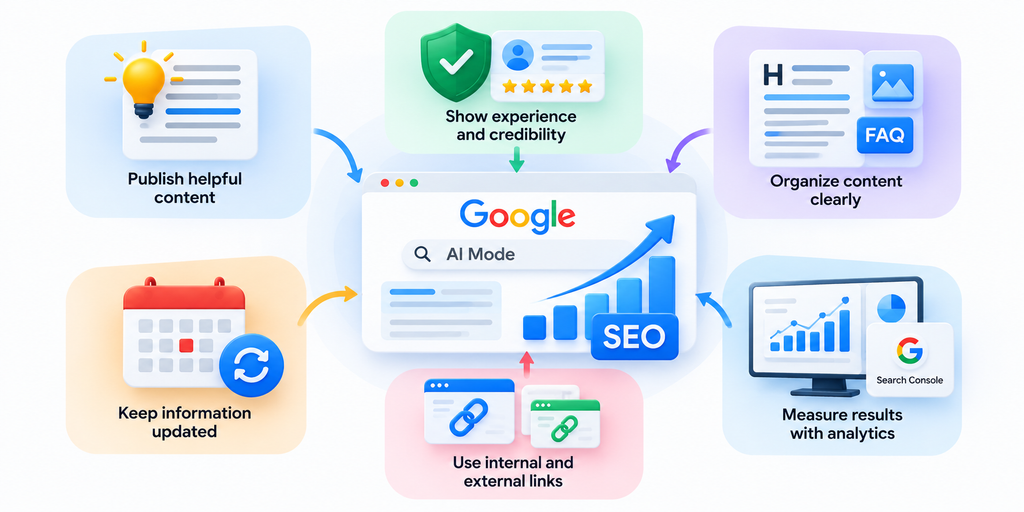
Publish genuinely helpful information
Answer the reader’s main question clearly, then provide practical detail, examples, comparisons, and original insights. Avoid creating pages that merely repeat information already available everywhere.
Demonstrate experience and credibility
Use accurate author information, clear editorial standards, trustworthy references, and relevant first-hand experience where available. Make it easy for readers to understand who created the content and why it is reliable.
Organize content clearly
Use descriptive headings, concise explanations, tables when useful, and FAQs that address real reader questions. Clear structure helps people navigate an article and understand its key points.
Keep information accurate and updated
Review time-sensitive articles when product features, availability, or pricing changes. Include dates where they help readers understand whether information is current.
Use internal and external links responsibly
Link to relevant pages on your own website to help readers discover related information. Cite official documentation and primary sources when they support important claims.
Measure results rather than guessing
Use Google Search Console and website analytics to monitor impressions, clicks, relevant queries, engagement, and conversions. Test changes over time instead of assuming that adding AI-related keywords will improve rankings.
For Tech Thrilled, the opportunity is to publish clear, accurate explainers that help readers understand what new AI features actually do and when they are useful.
Frequently Asked Questions
1. What is Google AI Mode?
Google AI Mode is a conversational AI search experience that provides AI-generated responses and links to relevant websites. It supports follow-up questions and can help users investigate complex topics.
2. Is Google AI Mode free?
Availability and access depend on the current product experience, region, and any feature-specific subscription requirements. Check Google’s official AI Mode page for the latest details.
3. Is Google AI Mode available in India?
Google lists India among the supported countries for AI Mode. The features available to a particular account may still vary by language, rollout, and product requirements. Check Google’s current AI Mode Help page for the latest information.
4. What is the difference between AI Mode and AI Overviews?
AI Overviews generally provide an AI-generated summary within Search. AI Mode is designed for more detailed questions and follow-up conversations, helping users explore a topic in greater depth.
5. Can Google AI Mode make mistakes?
Yes. Google explicitly warns that AI Mode responses may contain mistakes. Verify important information against reliable sources before using it.
6. Does Google AI Mode replace traditional Google Search?
No. AI-powered search adds another way to explore information, while web links and traditional search experiences remain important for discovering original content and checking sources.
7. How can websites improve their chances of appearing in AI-powered search results?
Publish helpful, original, accurate content; demonstrate credibility; use clear structure; maintain relevant pages; and follow Google’s search guidelines. No particular tactic guarantees inclusion in AI responses or higher rankings.
8. Does Google AI Mode affect SEO?
It changes how some users discover and interact with information, which can affect search behaviour and website traffic. Website owners should monitor Search Console data, create genuinely useful content, and avoid assuming that every AI-generated answer will produce a click.
Conclusion
Google AI Mode represents an important shift toward conversational, multimodal, and research-oriented search. Its ability to handle detailed questions, support follow-ups, and connect users with web resources can make information discovery more convenient.
The expansion of Gemini capabilities in 2026 adds another reason to follow Google’s evolving search ecosystem. Still, AI answers are not always correct, and availability can vary.
For users, the best approach is to ask specific questions and verify important information. For website owners, the priority is to create trustworthy, original, and genuinely helpful content that serves readers—not simply content designed to chase an AI trend.