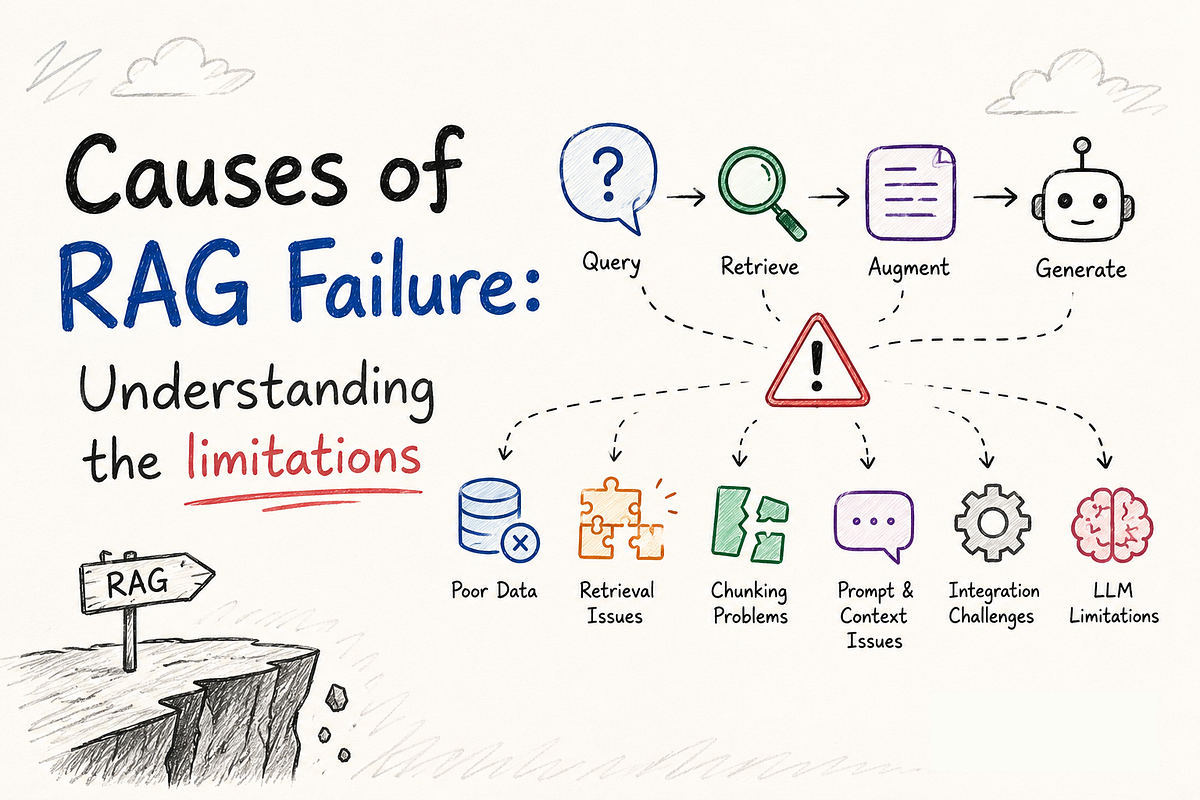
Retrieval-Augmented Generation (RAG) gives large language models access to external information, such as company documents, product manuals, technical guides, and private knowledge bases. But adding a search system to an LLM does not automatically make its answers accurate.
A RAG application can still return irrelevant passages, miss important details, use outdated documents, or confidently answer a question that its sources do not support.
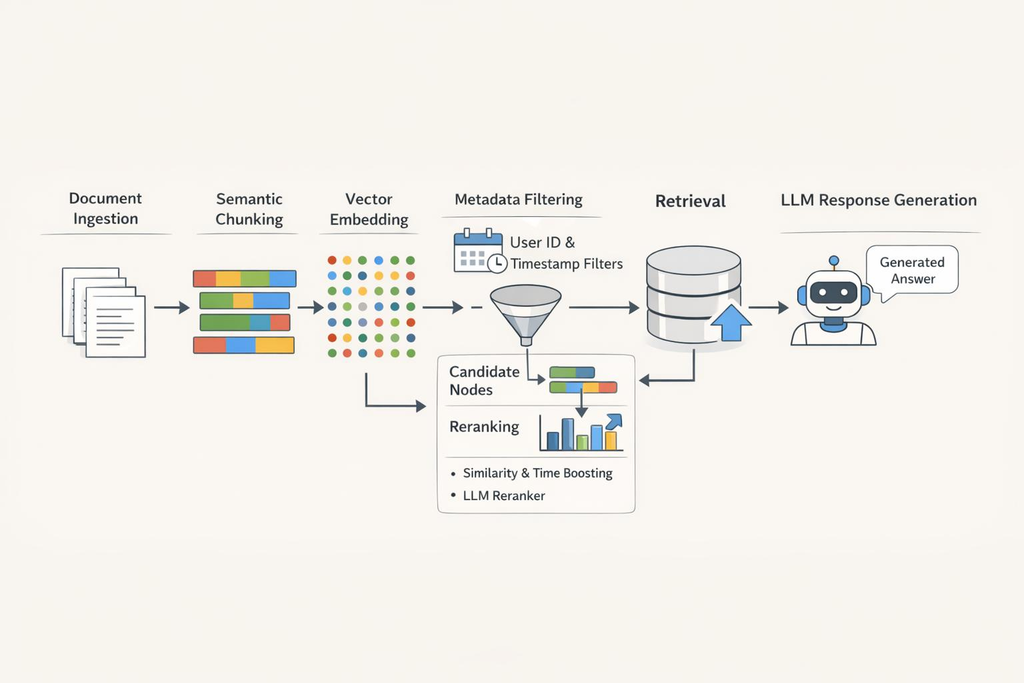
The good news is that many RAG failures are easier to diagnose when you look at each stage separately. Instead of changing your prompt every time the model produces a wrong answer, check whether the correct information was indexed, retrieved, ranked, and used properly.
This guide explains 15 common reasons RAG systems fail, how to recognize each problem, and practical ways to fix them.
What Causes RAG Systems to Fail?
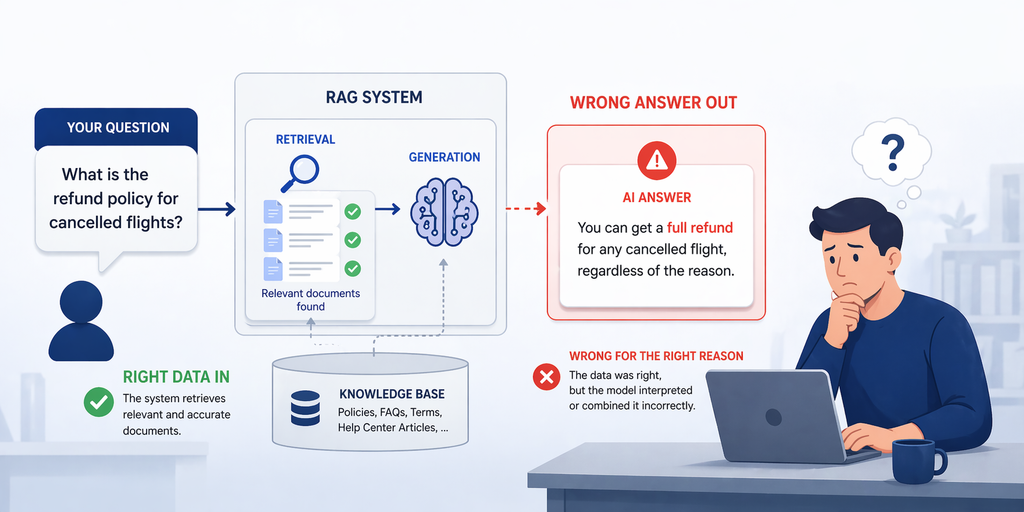
A typical RAG pipeline has three main stages:
- Retrieve: Search a knowledge base for information related to the user’s question.
- Augment: Add the retrieved passages to the model’s input.
- Generate: Use the question and retrieved context to produce an answer.
Every stage can introduce errors. If the right document never reaches the model, even a capable LLM cannot reliably answer from that missing evidence. If retrieval works but the prompt is unclear, the model may still misunderstand or ignore the available context.
Microsoft’s RAG documentation also highlights data preparation, retrieval quality, prompt design, security, and evaluation as important parts of a successful implementation.
The key lesson is simple: find the stage that failed before trying to fix the entire system.
15 Common RAG Problems and How to Fix Them
Data Preparation and Chunking Problems
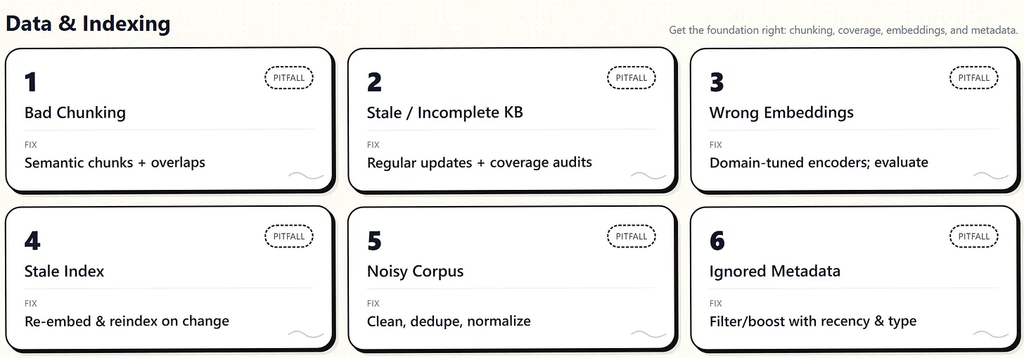
1. Poor Chunking Breaks Important Context
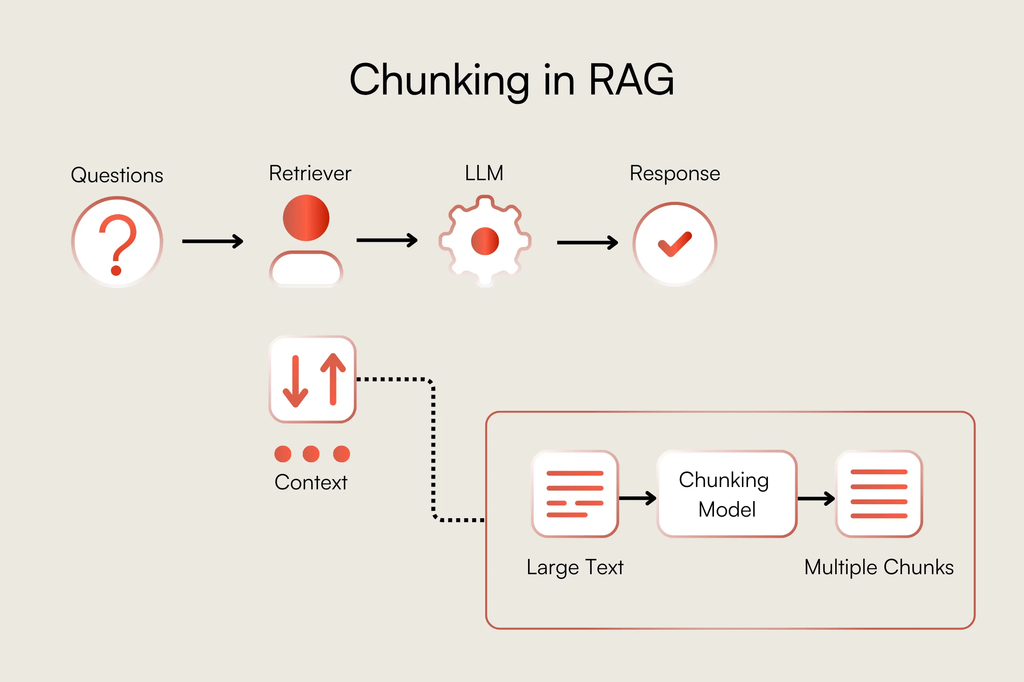
What happens: Documents are divided into chunks that are too large, too small, or split in the wrong places.
Imagine a product manual that explains a warranty across two paragraphs. If the chunking process separates the eligibility conditions from the warranty period, the retriever might find only half of the answer.
Very large chunks can include unrelated information, while tiny chunks may lose the context needed to understand a sentence.
How to fix it:
- Split documents using headings, paragraphs, and meaningful sections where possible.
- Keep related explanations, conditions, and examples together.
- Test different chunk sizes and overlap settings against real questions.
- Use document-specific strategies for tables, code, manuals, and long reports.
There is no universally best chunk size. Choose the strategy that produces the most useful retrieved context for your actual content. Microsoft’s chunking guidance explains why both oversized and undersized chunks can hurt retrieval quality.
2. Broken Document Parsing
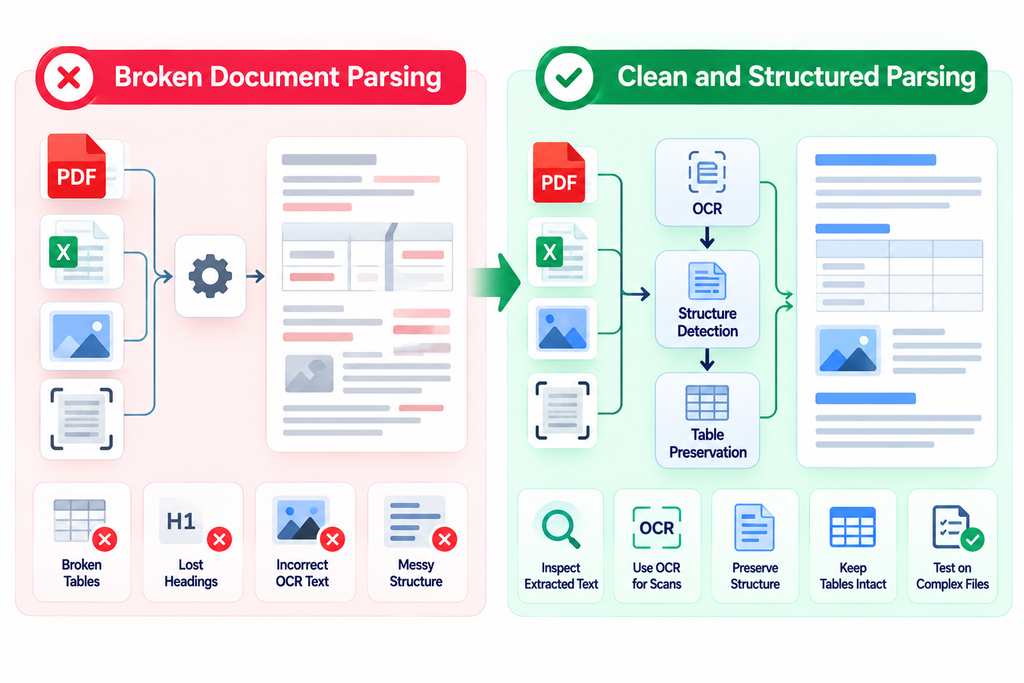
What happens: PDFs, tables, scanned files, or complex layouts are converted into messy text.
A table might lose its column relationships. A heading might become separated from its explanation. A scanned document might contain incorrect OCR text.
The content may technically exist in the index, but the meaning has already been damaged.
How to fix it:
- Inspect extracted text before indexing large collections.
- Use OCR for scanned documents when needed.
- Preserve headings, table relationships, and document structure.
- Test extraction on difficult files, not just clean text documents.
If the source is parsed incorrectly, changing the embedding model will not repair the missing or corrupted information.
3. Missing or Incorrect Metadata
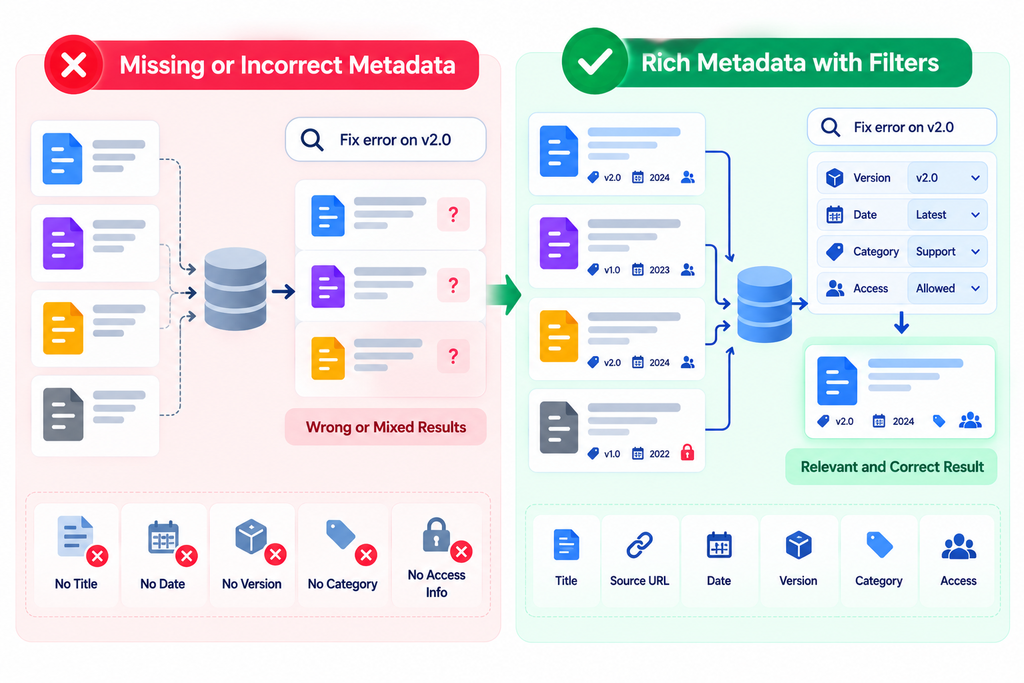
What happens: Retrieved passages lack useful details such as document title, publication date, product version, department, or access permissions.
For example, a support assistant might retrieve the right troubleshooting steps but fail to distinguish instructions for an older product version.
How to fix it:
Store useful metadata with every chunk, such as:
- Document title and source URL
- Product, category, or department
- Publication and update dates
- Version or release number
- Document-level access permissions
Use metadata filters when a question requires a specific product, time period, or user permission. Keep source identifiers attached to chunks so answers can be traced back to the original material.
4. Stale or Conflicting Data
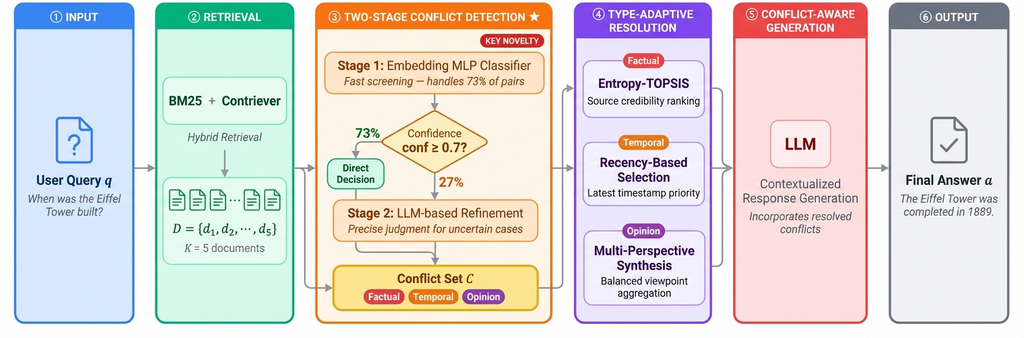
What happens: The index contains outdated policies, duplicated documents, or conflicting versions of the same information.
Suppose a company changes its refund policy from 30 days to 14 days. If the old policy remains searchable alongside the new one, the model may retrieve the wrong rule.
How to fix it:
- Create an update pipeline for new, changed, and deleted documents.
- Track source versions and last-updated timestamps.
- Remove or deactivate superseded content.
- Define which source takes priority when documents conflict.
- Test whether changes in the original source reach the index.
RAG can provide access to changing information, but only if the underlying data and index are maintained.
Search and Retrieval Problems
5. The Embedding Model Does Not Understand Your Domain
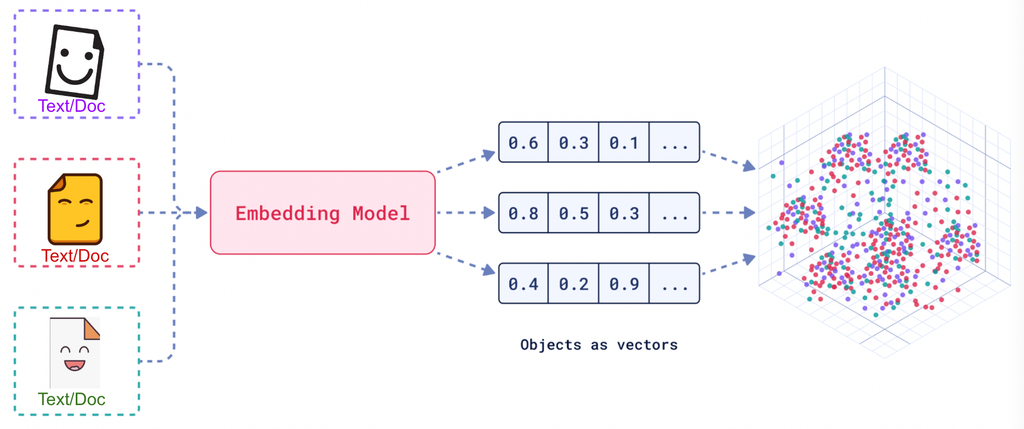
What happens: Vector search fails to match a question with the passage that contains the answer.
This can happen when your content uses specialized vocabulary, abbreviations, product codes, or technical phrases that do not match the user’s wording.
How to fix it:
- Test the embedding model on representative domain-specific questions.
- Compare retrieved results with known relevant documents.
- Evaluate alternative embedding models when the current one performs poorly.
- Make sure queries and indexed documents use compatible embedding models and dimensions.
- Combine semantic search with keyword search when exact terms matter.
Do not choose an embedding model only because it performs well on a general benchmark. Measure how well it retrieves your own content.
6. Vector Search Misses Exact Keywords
What happens: A semantically similar passage ranks above the document containing the exact identifier the user needs.
For example, a query for ERR-1042 might retrieve a general troubleshooting guide instead of the specific error-code entry.
How to fix it:
Use hybrid retrieval when appropriate. It combines vector-based semantic search with lexical or keyword search, helping the system handle both meaning and exact matches.
This is especially useful for:
- Product IDs and SKUs
- Error codes
- API names and function identifiers
- Legal clauses and policy numbers
- Exact phrases and version numbers
7. Poor Query Formulation
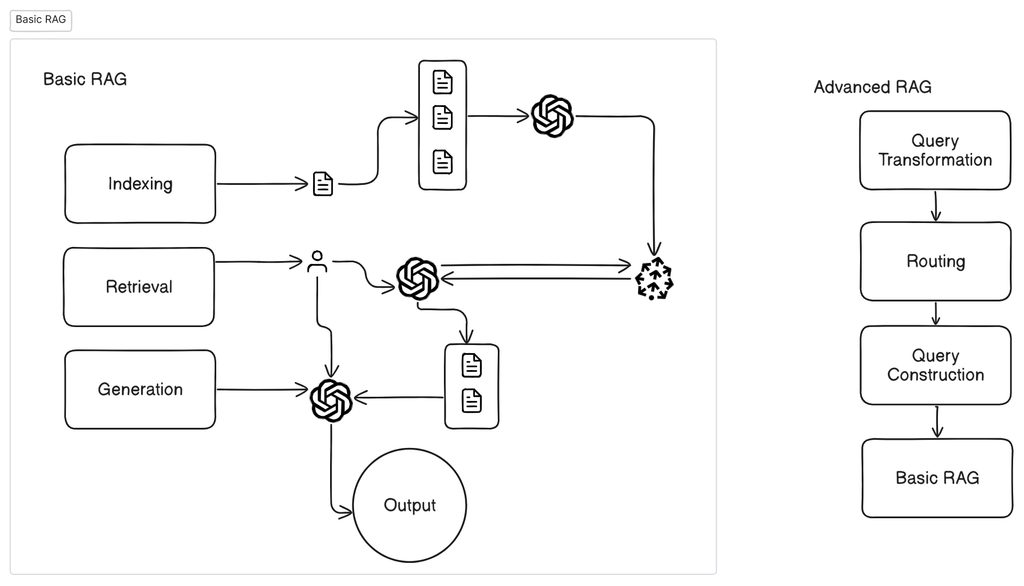
What happens: The search query does not express the information the user actually needs.
A question such as “Why does it fail after the update?” may be unclear without the earlier conversation, product name, or error details.
How to fix it:
- Rewrite ambiguous questions into clearer search queries.
- Expand abbreviations when useful.
- Include relevant conversation context.
- Break multi-part questions into smaller queries when necessary.
- Preserve exact identifiers instead of rewriting everything semantically.
For complex questions, query rewriting or query decomposition can improve coverage. However, query transformations should be evaluated because they can also introduce assumptions or remove important details.
8. The Retriever Returns Too Few or Too Many Results
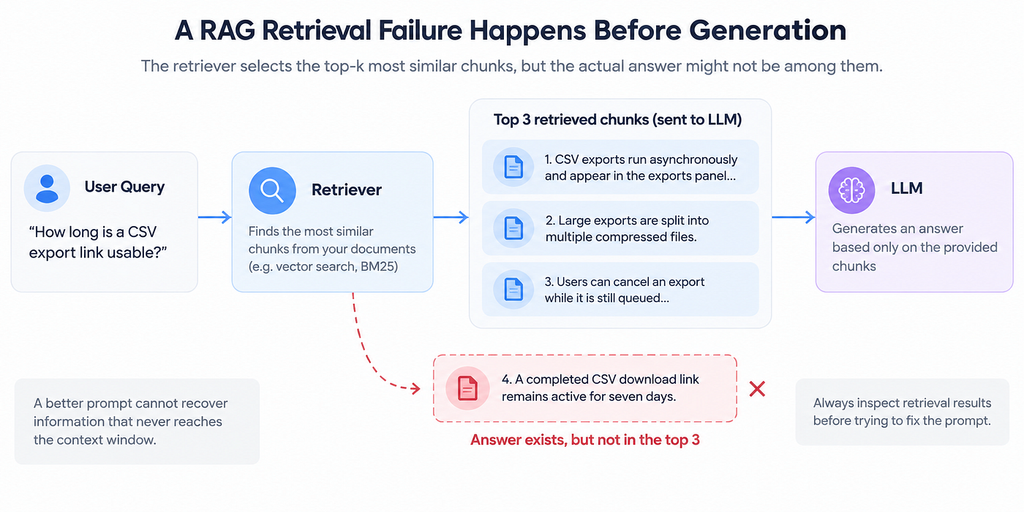
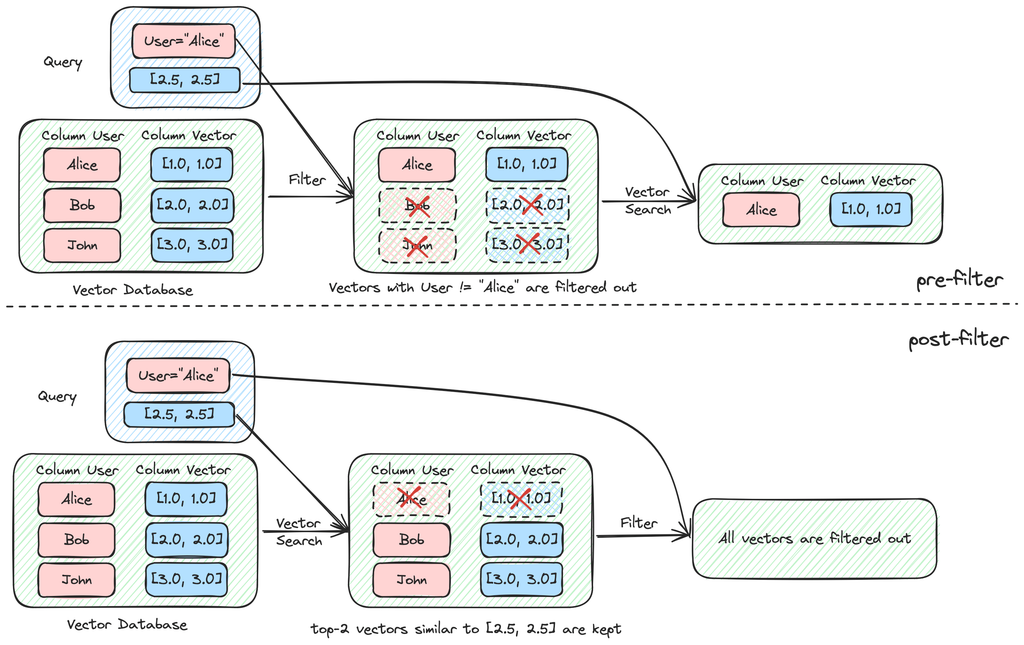
What happens: The correct passage is missing from the results, or the model receives so much unrelated context that the answer becomes less reliable.
Returning only one result may miss an important condition. Returning dozens of weakly related chunks can waste tokens and distract the model.
How to fix it:
- Tune the number of retrieved results, often called top-k.
- Measure whether relevant documents appear within the first few results.
- Use filters to remove irrelevant categories or versions.
- Rerank candidates before passing them to the LLM.
- Test retrieval quality across simple and complex questions.
Increasing top-k is not automatically a solution. More results help only when they add useful evidence.
Ranking and Context Problems
9. Relevant Documents Rank Too Low
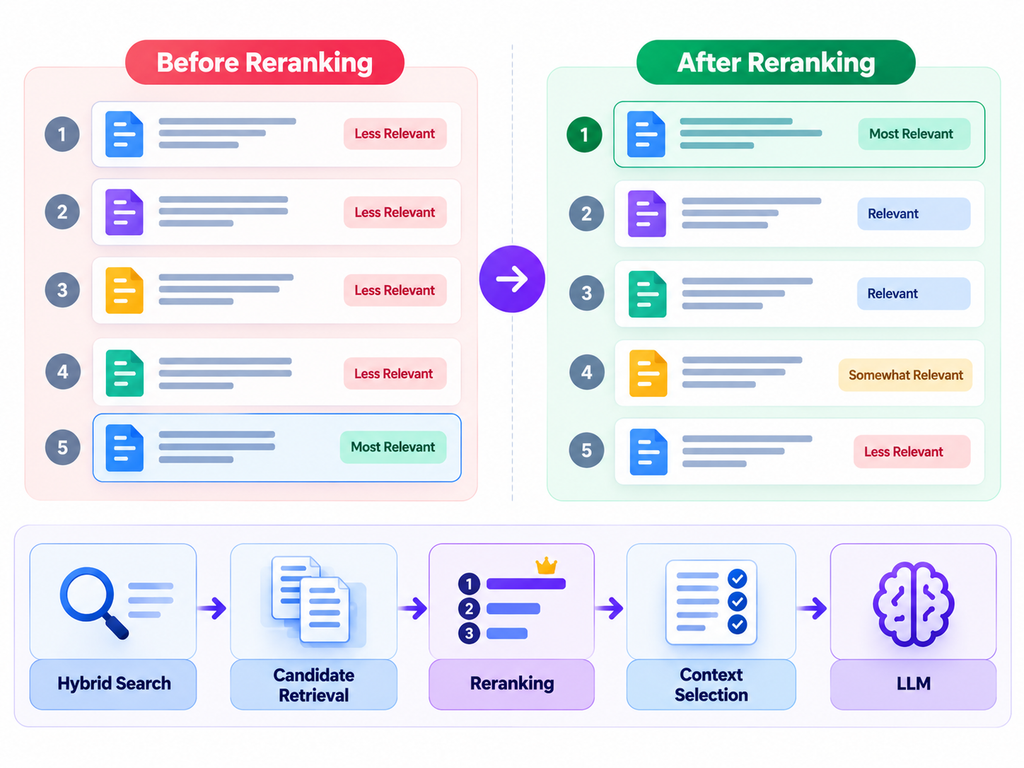
What happens: The correct passage is retrieved but appears below less relevant results, so it never reaches the model’s context window.
This is a ranking problem rather than a missing-document problem.
How to fix it:
Add a reranking stage when testing shows that initial search results are poorly ordered. A reranker evaluates the relationship between the query and candidate passages and reorders them by relevance.
A common pipeline is:
Hybrid search → Candidate retrieval → Reranking → Context selection → LLM
Compare the results before and after reranking. Check retrieval quality, latency, and cost to determine whether the improvement justifies the additional processing.
10. Retrieved Context Is Noisy or Redundant
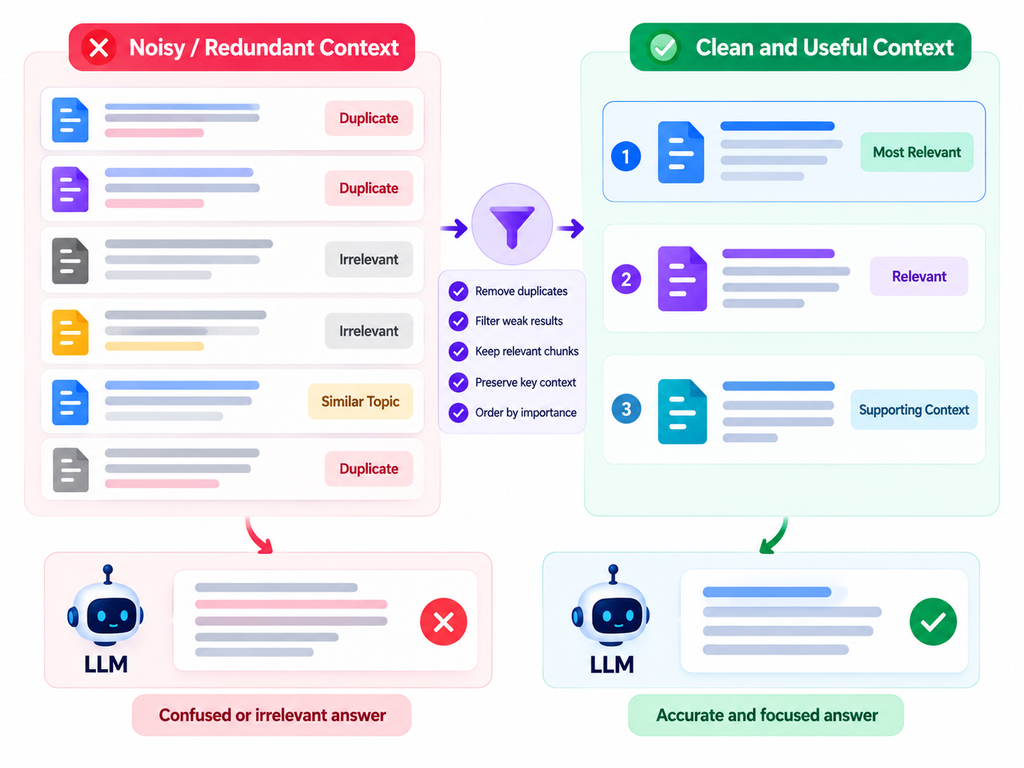
What happens: The model receives several passages that repeat the same information, contain irrelevant details, or discuss slightly different topics.
More context does not always produce a better answer. It can consume the token budget and make the important evidence harder to identify.
How to fix it:
- Remove duplicate and near-duplicate chunks.
- Filter weakly relevant passages.
- Prefer evidence that directly answers the question.
- Preserve enough surrounding context to explain important conditions.
- Order passages so the strongest evidence is easy to identify.
Aim for useful context, not the largest possible context.
11. Important Relationships Are Lost Across Chunks
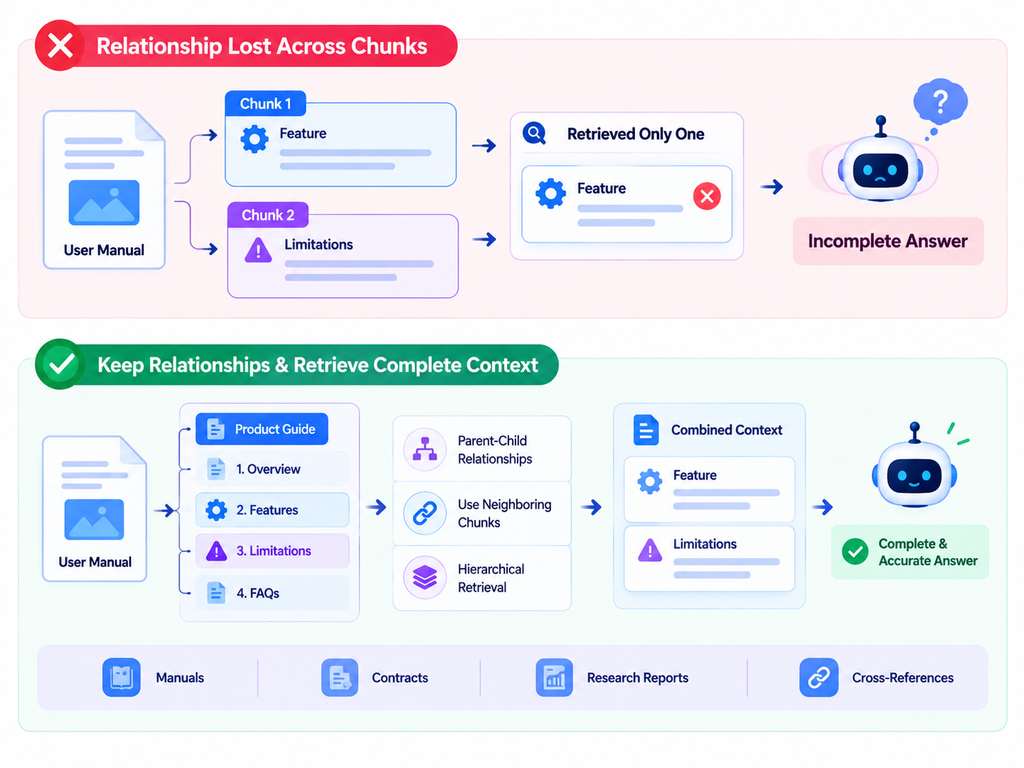
What happens: The answer depends on information spread across multiple sections, but the system retrieves only one of them.
For example, a technical document might define a feature in one section and list its limitations in another. Either passage alone gives an incomplete picture.
How to fix it:
- Preserve parent-child relationships between chunks and documents.
- Store section headings and parent document identifiers.
- Retrieve neighboring chunks when the answer needs surrounding context.
- Use hierarchical retrieval for long or structured documents.
- Test multi-part questions that require combining evidence.
This problem is particularly common in manuals, contracts, research reports, and documentation with cross-references.
Generation and Reliability Problems
12. The LLM Hallucinates Despite Good Retrieval
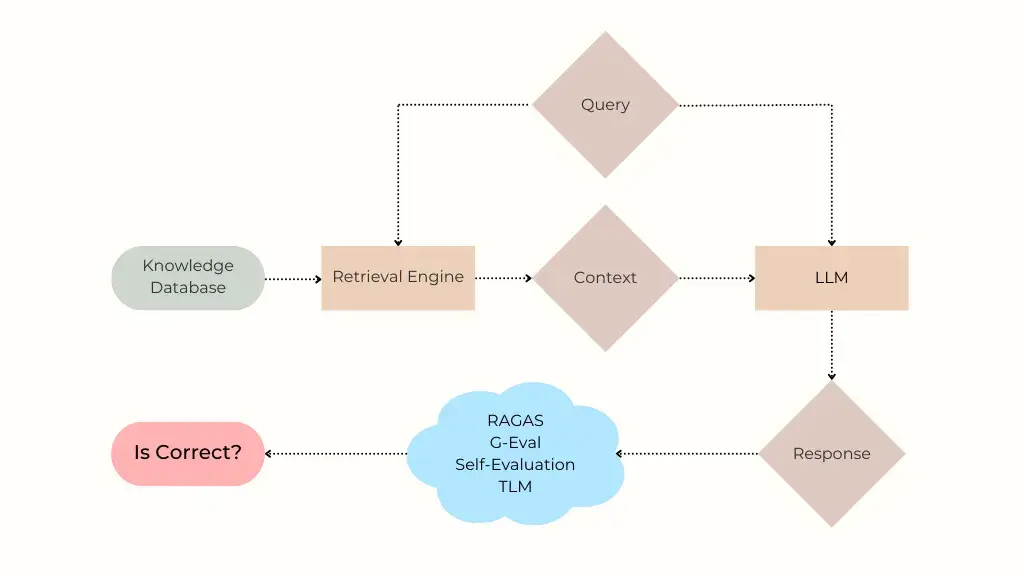
What happens: The correct information is present, but the model adds unsupported details or makes claims that contradict the evidence.
RAG reduces reliance on the model’s internal knowledge for a given answer, but it does not guarantee factual accuracy.
How to fix it:
Use clear instructions that tell the model to:
- Answer from the supplied evidence.
- Avoid inventing missing facts.
- Say when the sources do not contain enough information.
- Distinguish source-backed facts from uncertainty.
- Include citations that genuinely support the claims.
Inspect the retrieved context and the final answer separately. If the context is correct but the answer is not, focus on generation, prompt design, and answer evaluation rather than rebuilding the index immediately.
13. The Prompt Is Vague or Poorly Structured
What happens: The model receives relevant passages but does not know how to prioritize them, handle contradictions, or respond when evidence is missing.
How to fix it:
Give the model a clear task, the user question, organized context, and explicit rules for uncertainty and citations.
For example:
Answer using the supplied context. If the context does not contain enough evidence, state that clearly. Do not invent facts. Cite the source passages that support your answer.
Test prompt changes against a fixed set of questions. A prompt that improves one example may perform worse on other question types, so evaluate the full test set before deploying it.
14. No Proper Evaluation or Monitoring
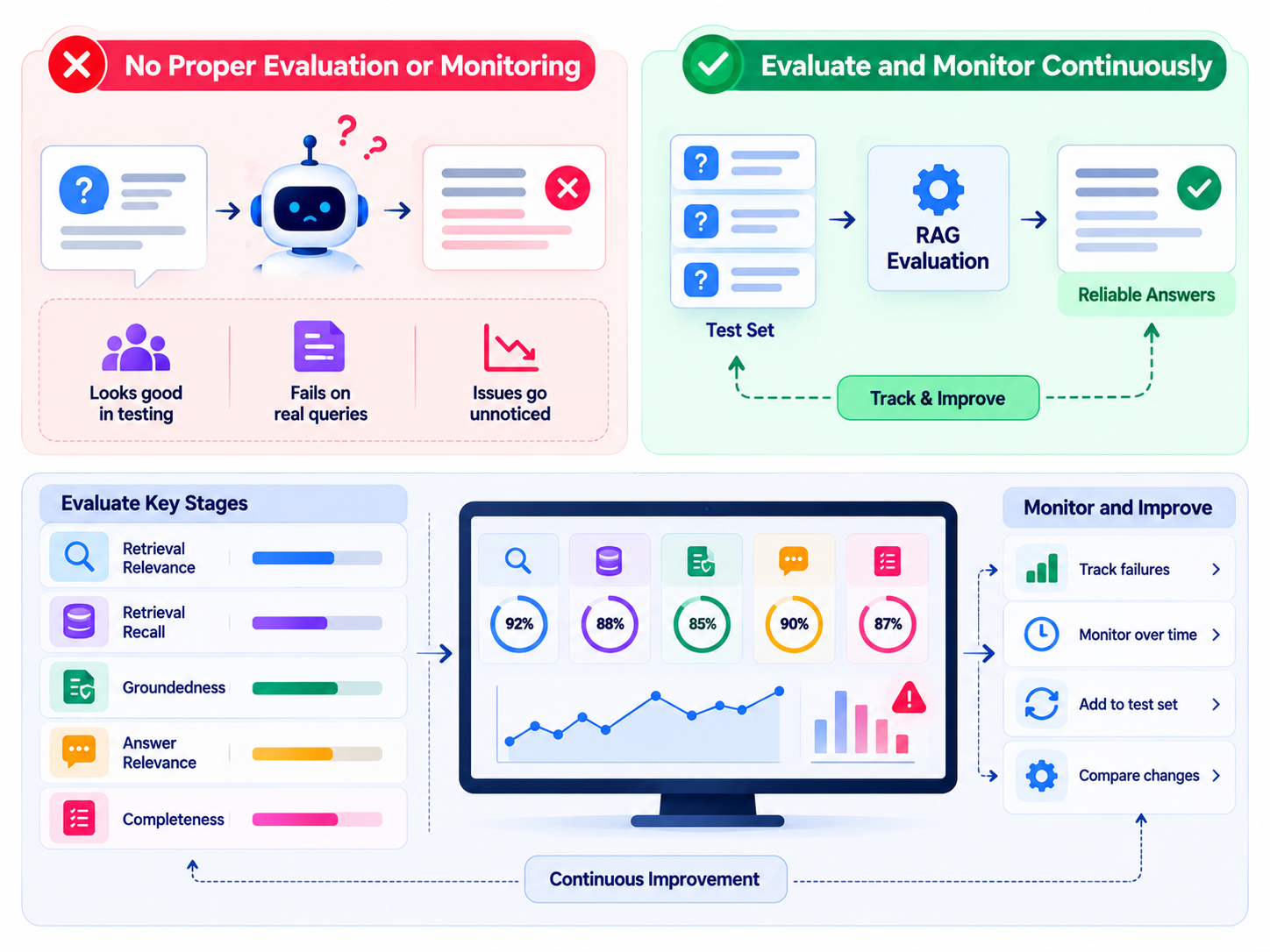
What happens: The application looks convincing during a few manual tests but fails on real user questions.
Without systematic evaluation, developers may not notice that a new embedding model, chunking strategy, or prompt has made retrieval worse.
How to fix it:
Build a test set containing realistic questions and expected supporting documents or answers. Measure separate stages:
- Retrieval relevance: Did the system find useful passages?
- Retrieval recall: Did it find the important evidence that was available?
- Groundedness: Does the answer stay consistent with retrieved context?
- Answer relevance: Does it actually answer the user’s question?
- Completeness: Does it cover the important parts of the request?
Microsoft’s RAG evaluator documentation describes evaluating retrieval quality, groundedness, relevance, and response completeness.
Track failures over time, and add every important production failure to your regression test set.
15. Security and Access Controls Are Missing
What happens: The retriever exposes information that the user should not be allowed to access, or malicious instructions inside retrieved content influence the model.
This is not just an answer-quality issue. It can become a data security problem.
How to fix it:
- Enforce permissions during retrieval, not only in the final prompt.
- Apply tenant and document-level filters.
- Treat retrieved documents as untrusted content.
- Do not allow retrieved text to override system instructions.
- Restrict tool permissions and protect credentials.
- Test for unauthorized document retrieval and prompt injection.
Review security controls whenever you change the indexing process, retrieval filters, or connected data sources.
How to Diagnose a Failing RAG System
When an answer is wrong, avoid immediately changing the model or rewriting the entire prompt. Follow this troubleshooting process instead.
Step 1: Inspect the Retrieved Chunks
Log the exact passages, source IDs, relevance scores, and metadata supplied to the model.
Ask: Was the correct evidence present?
Step 2: Check the Index
If the evidence was missing, search the original documents. Confirm that the source was parsed correctly, chunked properly, embedded, and indexed.
Step 3: Review Ranking and Context Selection
If the correct passage was retrieved but excluded from the final context, inspect ranking, filtering, reranking, and top-k settings.
Step 4: Review the Final Answer
If the evidence was correct and present, check whether the model ignored it, misinterpreted it, combined conflicting information, or invented unsupported claims.
Step 5: Test the Fix
Run the original failed question and a broader regression set. Measure whether the change improves the intended metric without damaging other questions.
This process helps isolate the actual cause instead of treating every failure as a prompt problem.
How to Prevent RAG Failures in Production
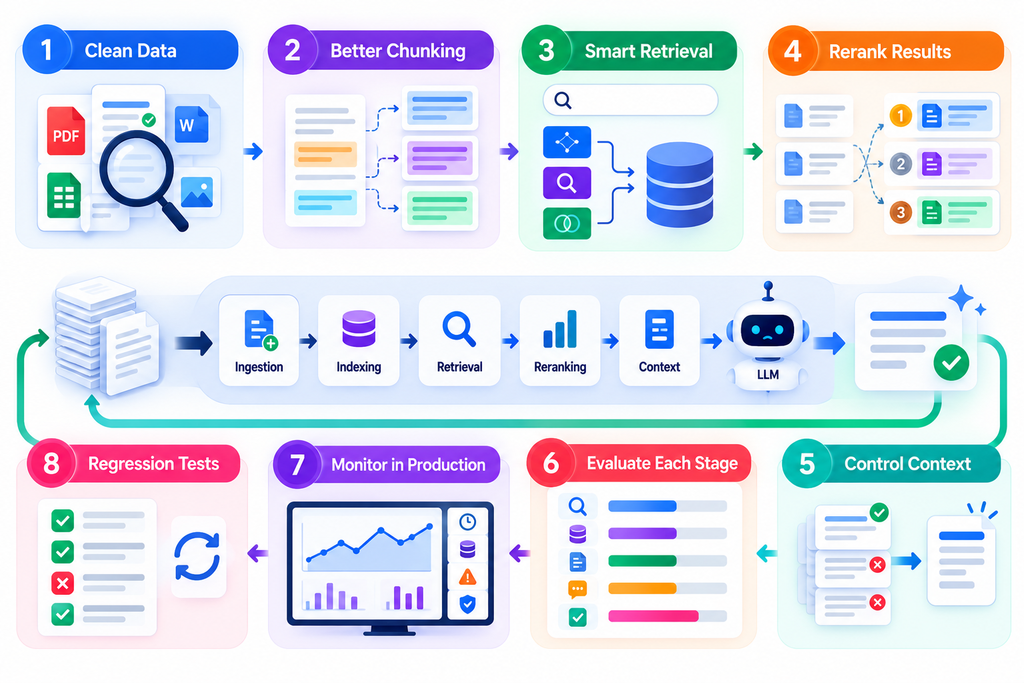
Reliable RAG is not a one-time setup. It needs a repeatable engineering process.
- Start with clean data. Validate extraction, document structure, metadata, and source freshness.
- Tune chunking empirically. Compare chunking approaches using realistic questions.
- Choose retrieval strategies based on evidence. Test vector, keyword, and hybrid search.
- Rerank when it helps. Measure whether reranking improves relevant results enough to justify its cost.
- Control the context window. Supply the strongest evidence rather than every available passage.
- Evaluate each stage. Keep retrieval metrics separate from answer-quality metrics.
- Monitor real usage. Track latency, token costs, retrieval failures, answer quality, and security events.
- Maintain regression tests. Re-run known failure cases whenever you change the model, index, prompts, or retrieval configuration.
The most important rule is to make changes based on measured results. A sophisticated retrieval pipeline is not automatically better than a simple one. The best architecture is the one that reliably answers your users’ questions at an acceptable cost and response time.
Frequently Asked Questions
1. Why do RAG systems fail?
RAG systems can fail because of poor document parsing, bad chunking, weak retrieval, outdated information, incorrect ranking, missing context, or unsupported LLM-generated claims. The first step is to determine whether the correct evidence reached the model.
2. Does RAG eliminate hallucinations?
No. RAG can reduce unsupported answers by providing relevant evidence, but the model may still misinterpret the context or invent details. Clear grounding instructions, citations, evaluation, and appropriate handling of missing evidence help reduce this risk.
3. How do I know whether retrieval or generation is the problem?
Inspect the exact context passed to the LLM. If the correct evidence is missing, investigate ingestion, indexing, chunking, search, and ranking. If the evidence is present but the answer is wrong, investigate context construction, prompting, and generation.
4. What is the best chunk size for RAG?
There is no universal best chunk size. The right size depends on document structure, question types, retrieval method, and context limits. Test multiple chunking strategies using representative questions and measure retrieval and answer quality.
5. Does hybrid search improve RAG?
Hybrid search can improve retrieval when users ask questions that require both semantic matching and exact keyword matches. Its value depends on your data and query patterns, so compare it with your existing retrieval method using the same evaluation set.
6. What does reranking do in a RAG pipeline?
Reranking reorders retrieved candidate passages based on their relevance to the user’s question. It can help surface useful evidence that initially ranked too low, but it adds processing time and cost.
7. How should I evaluate a RAG application?
Evaluate retrieval and generation separately. Measure whether relevant evidence is retrieved, whether the final response is grounded, whether it answers the question, and whether it covers important information. Include realistic test cases and repeat them after system changes.
8. Can outdated documents cause RAG hallucinations?
Yes. If outdated or conflicting documents remain searchable, the model may generate an answer based on obsolete information. Use version tracking, source timestamps, reliable update pipelines, and filters that prioritize current authoritative documents.
9. How often should a RAG knowledge base be updated?
Update frequency depends on how quickly the source data changes. Frequently changing policies or inventory may require near-real-time updates, while stable technical documentation may need less frequent refreshes. Monitor source changes and establish a freshness requirement for your use case.
Conclusion
RAG systems rarely become reliable simply by adding more documents or using a more powerful LLM. Accuracy depends on the entire pipeline: data preparation, chunking, retrieval, ranking, context construction, generation, evaluation, and security.
When a RAG answer fails, start by inspecting the evidence the model actually received. Fix the earliest stage where the failure occurred, then verify the improvement with repeatable tests.
The goal is not to retrieve more information. It is to retrieve the right information and use it correctly.